Skip to content

Everything else

Electrics, Pneumatics, Propulsion, Hydraulics, Rain Repellant, etc

  1. Started by AVFC,

    Hello Aerosoft Forum, Yesterday I received shipping confirmation for my TM TCA Quadrant Add-On from Aerosoft Shop. Really a nice surprice 😊 thank you. Any update planned for key assignment/mapping (landing gear, parking brake ect.) or is the new device plug&play? Take care. Brgds.

  2. Started by whitshark97,

    im operating p3d 5.2 and i just downloaded the a330 then when i start the sim it shows me this msg ( ERROR: ND log file could not be generated! ) and also there is a path : C:\Program Files\Lockheed Martin\Prepar3D v5\Aerosoft A330 Pro V5\Data\AB_ND_GDI.log also the FCU shows me nonsense numbers ??!! please anyone any idea how can i solve this problem ?

    • 1 reply
    • 1.2k views
  3. Started by MikaV,

    Is Airbus pro series compatible P3D5.2 So Can I update Prepar new client?

  4. Started by Natesnake01,

    Hi i have attempted several times now to do a flight in the A330 and am unable. Consistently after 5 or six minutes in the air p3d will freeze and crash, the first two times it was not logged the last time this is the log i got

    • 1 reply
    • 768 views
  5. Started by squashplayer,

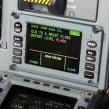
    Hi, today I loaded not enough fuel in my A330 professional, but only noticed it midflight. Went to the center CDU and entered 20 tons, but the button for loading the fuel is grayed out (see image). How can I load fuel in flight? Thx

    • 2 replies
    • 2k views
  6. Started by ALESSIOTOLU,

    hi guys i have a question about the 330 using vatsim / ivao I have to have some other software to be able to interact via cpdlc with vatsim / ivao for example I have read on past posts that you have to register on a hoppie site. currently what work do I have to do to be able to use cpdlc with the 330? thank you all

  7. Started by GaryMcCl,

    In the cockpit, if I have the Options/Sounds checkbox checked, it's been perfect. For some reason, however, it sounds like there are some real people there! I can't find any option that would make it sound like I can only hear the noise from aircraft or copilot... Where are there other (mainly Canadian) voices coming from in the background, and how do I turn it off ?

    • 2 replies
    • 1.1k views
  8. Started by ALESSIOTOLU,

    Hi everyone i check this during my flight . All weight was inserted correct like ever But i saw this difference between gw on mcdu and gw in the cruise page . Thanks to all.

    • 2 replies
    • 1k views
  9. Started by ALESSIOTOLU,

    Can someone please explain this discrepancy thanks 0 pax 0 cargo 0 fuel Tow 41.2 Gw mcdu 41.2 Gw 44.0 ( on ecam ) Why????

  10. Started by johnk51,

    I've started getting a sound system error when loading my a321. It says it can't find a media file in the aerosoft a320-a321 professional base\sound_asc\asc_pf_onauto.wav. I can't find that file anywhere. I find the asc_pf_on.wav, and the asc_pf_off.wav. How can I fix this problem.

    • 2 replies
    • 862 views
  11. Hi I had version 1.3.1.0 all worked fine, I updated to 1.4.2.0 and when I start P3d V4.5 it says ASC\ASC_PF_On Auto.wav is missing as P3 D is starting up. if i close message 3d continues to load , I set up flight and then the sim crashes to desktop at after starting with a black screen. Roll back to 1.3.1.0 and all is fine again. can anyone help. The file that it says is missing is not in the folder on either version. When I run the updated App, should I switch off antivirus program as I do when installing main product? best regards Derek

    • 1 reply
    • 608 views
  12. Started by Bibokob,

    Hello, After my landing with the all Airbus Professional Family, i have the problem that when i put on the apu master "ON", i'm waiting to have "FLAP OPEN" on the screen and after that, i want to start the apu so i press "APU START" but it is not working. Anyone have a solution please !! Thanks .

    • 0 replies
    • 556 views
  13. Started by keenrw,

    Hi I have noticed that the TCAS targets can be 100feet below the correct Alt … For example .. im flying to LEPA ..a friend of mine is behind me ... im at FL400 in the Aerosoft A330, and he is at FL380 in the FSLABs A320 ... .. On my ND he is showing -19 not 20 as i would expect… On his ND its showing me at the correct +20 above him. Thanks Rich

    • 3 replies
    • 861 views
  14. Hi I installed the new Airbus updates for the A318-A320 for Prepar3D_v4_Academic_4.5.13.32097 the A318-A319 and A320-A321 have not the updated Configurator.exe. Can tell because it's missing the TCA option....as you can see in the pics below. Thanks CLAUDE FORTIN

    • 3 replies
    • 1k views
  15. Started by JereAarnia,

    Afther small update from Aerosoft updater this pop ups?

    • 2 replies
    • 826 views
  16. Started by kylep,

    I was using P3dv4.5 with all the latest updates. I was doing a flight yesterday KDFW Dallas Fort worth to KLAX Los Angeles. Everything was fine I was on approach to 25L ILS approach approaching LIMMA intersection where I began configuring the aircraft to flaps 3 and gear down. I was doing a Flaps 3 landing that was my set up. As soon as I decided to activate the secondary Flight plan due to ATC on vatsim asking me to switch to runway ILS25R instead I had a CTD. Just to let you all know incase of anything I'm a real world Airbus pilot we do load back up approaches in the secondary FP depending where the approach is especially KLAX because of the amount of runways…

    • 2 replies
    • 1.3k views
  17. Started by wildeboer,

    flying lepa-egnx just entering the englisch coast, fl360 and a 1/2 houre to eta.. the A319 went total black , not because fuel is empty , no restart possible. how is that possible???

    • 2 replies
    • 878 views
  18. Hi All, I'm not a fan of the default camera views being taken over by Aerosoft products. How can I remove the system completely so that my F9-F12 keys work per default? Totally disabling view system? - Settings/Options MCDU - AEROSOFT COMMUNITY SERVICES I found this, but it's a very old post. I've also changed this setting; Which doesn't affect the F keys in anyway. Any help appreciated.

    • 5 replies
    • 1.2k views
  19. Started by Richard Myers,

    I have moved to a new PC and initially installed v.1.3.1.0 of the A318 / A319 Professional product into P3Dv4. Via the ASUpdater the product was then updated to v.1.4.0.1. In v.1.3.1.0 the livery shown below loaded up without any problems. However with v.1.4.0.1 I get the problem shown. The liveries shipped with the product show without a problem. I have tried to install the problem livery both using the Livery Installer and manually by editing the aircraft config. Can you help please?

  20. Started by Richard Myers,

    When I choose an A318 / A319 I get the error in the image below; Any suggestions on how to fix this please?

  21. This has happened to me twice after making a VOR approach and landing at LEJR and after an ils approach and landing at LEMD. First when landing i could engage reverse thrust by even present F2 repeatedly but i had auto brakes medium so they braked for me the plane but after finishing my roll out and reducing my speed to taxi speed i also noticed that the nose-gear didn't steer at any direction.

  22. Hi, Continual crashing to desktop on the P3D 5.1, A330 after around 5-10 minutes Seems to be something to do with XAudio2_4 Anyone able to assist ? Cheers, Matt Log Name: Application Source: Application Error Date: 25/04/2021 3:38:49 PM Event ID: 1000 Task Category: (100) Level: Error Keywords: Classic User: N/A Computer: DESKTOP-MV51TRQ Description: Faulting application name: Prepar3D.exe, version: 5.1.12.26829, time stamp: 0x5fb44f72 Faulting module name: XAudio2_4.dll_unloaded, version: 9.26.1590.0, time stamp: 0x49bebddc …

    • 6 replies
    • 3.5k views
  23. Hi I have installed the A320 Family Professional Bundle today and Im having the following error Thanks

  24. Started by firstcaptainjones,

    Hi Guys, Looking for a little help or advice if i may,i had to do a complete reinstall of windows over the past few days.Before the reinstall all the buses where performing fine, A318,A319,A320,A321 and the A330 no issues at all.After the reinstall of windows the A330 is fine,but the smaller buses are causing me problems,when the planes are at the loading screen i get the message,sound system error,failed to fine media file,Base\Sound_ASC\ASC.PF.On.OnAuto.wav.I have tried 3 reinstalls of the smaller buses,with the anti virus turned off,but still the same problem,sometimes the plane will load but sometimes it CTD with the faulting module KERNELBA…

    • 2 replies
    • 1.3k views
  25. Hi, i'm planning to build home cockpit for a320. Is there any way to read and write switches and button positions via simconnect in P3D4.5?

Important Information

We have placed cookies on your device to help make this website better. You can adjust your cookie settings, otherwise we'll assume you're okay to continue. Privacy Policy & Terms of Use

Account

Navigation

Search

Search

Configure browser push notifications

Chrome (Android)
  1. Tap the lock icon next to the address bar.
  2. Tap Permissions → Notifications.
  3. Adjust your preference.
Chrome (Desktop)
  1. Click the padlock icon in the address bar.
  2. Select Site settings.
  3. Find Notifications and adjust your preference.