Skip to content

Marten

Members
  • Joined

  • Last visited

  1. Marten changed their profile photo
  2. RailfanCavion started following Marten
    • 11096 downloads
    • Version 1.4.3
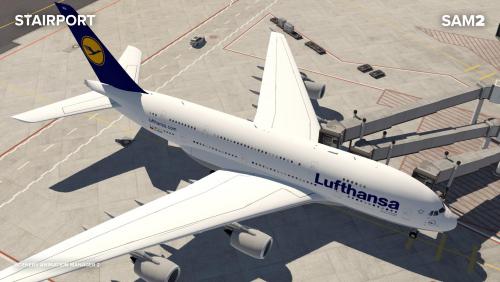
    DYNAMIC ENVIRONMENT PLUGIN SAM is a native XP11 plugin offering different possibilities to scenery authors focused on animations. It is currently seperated into two main parts: Custom Datarefs You can create custom datarefs without any knowledge and control the values through a settings menu. With user checkboxes you can even let the user control animations such as opening hangars, switching lights and anything else a scenery developer might think of. Jetway Animation We made a deep dive into the world of math to create realistic jetway animations basically because the current software available is not sufficient. Now you can add jetways within seconds to a scenery. _____________________ Performance The plugin is highly optimized for performance. The most obvious part is the fact that calculations for datarefs only start when an object is loaded and in visible range. It can be used in hundreds of sceneries without any noticeable fps impact. The plugin is installed into the main plugin directory, thus it's a global plugin and not per scenery. The sceneries only contain an xml file with the settings. Library A library with pre-animated objects like Jetways, VDGS, Marshaller, Hangars, Wind Turbines etc. is the starting point for developers to experiment with. You can either use these objects or create and animate your own. License The plugin is licensed under CC BY-NC-ND 4.0 which means it is free to use for all users and for all freeware sceneries. If you are a payware developer you can get a license for your project here. Compatible OS Windows 10 | Linux | MacOS 10.14+ Installation Please install SAM Suite, run it and select the features of choice to download and install Support Please use our help desk in case you need any help.
  3. Ist es möglich, dass die Papis der 32L falsch eingestellt sind? Ich hatte beim ILS Anflug durchgehend rot gesehen...
  4. Schon unterwegs, vielen Dank!
  5. MSFlight ist Geschichte...
  6. Marten replied to Marten's topic in CRJ 200 (JRollon)
    Naja, dann fehlen eben die einzelnen Layer bzgl Schmutz, Nieten, etc...
  7. Marten posted a topic in CRJ 200 (JRollon)
    Moin Heinz, gibt es eigentlich ein Paintkit von der CRJ? Wenn nicht könntest du mal Javier ansprechen? Gruß Marten
  8. Wär trotzdem schön, wenn sich jemand bereit erklären würde, die Lösung für 10.05 zu posten...
  9. Bin gespannt die Lösung zu hören
  10. Hallo zusammen, es ist wie verhext: Sobald ich in Palermo LICJ in Richtung Norden starte und ca. 10nm vom Platz entfernt bin, friert xp ein. Dabei scheint der Flugzeugtyp und die Szenerie egal zu sein (getestet mit osm2xp und zuletzt mit Standard in 6 Versuchen). Kann das jemand bestätigen? Gruß Marten
  11. Bingo, das wars, vielen Dank!
  12. Hallo zusammen, leider hab ich seit neuestem ein großes Soundproblem mit der CRJ 200. Schau, bzw. besser hört euch dazu einfach das Video an (komplett). Ich habe an meinem System bewusst nichts verändert. Vorher lief alles. Eine Neuinstallation des Fliegers sowie X-Plane selbst hat leider nicht geholfen. Was könnte das wohl sein? Gruß Marten http://www.youtube.com/watch?v=YDAlxqwn_LQ&feature=g-upl
  13. Ob du das ändern kannst, weiß ich nicht aber du kannst natürlich trotzdem die ILS Frequenz eindrehen und danach deinen Anflug fliegen. Bekommt der xp-Lotse ja nicht mit
  14. Grundsätzlich helfen dabei natürlich die VFR-Karten der DFS. Unter diesem Link findest du die sogar online ohne Anmeldung. Wähle oben rechts bei "Karte" einfach "ICAO" aus und schon hast du die aktuellen Charts.
  15. Gonna be a good addon. Hope to see the release soon!
  16. Von g2xpl hab ich schon gehört allerdings scheint es dieses Programm/website nicht mehr zu geben. Finde zumindest bei google nur Links zu nicht mehr existierenden Forenbeiträgen. Hier liest sich der Hinweis raus, dass es wohl um ein rechtliches Problem ging.

Important Information

We have placed cookies on your device to help make this website better. You can adjust your cookie settings, otherwise we'll assume you're okay to continue. Privacy Policy & Terms of Use

Account

Navigation

Search

Search

Configure browser push notifications

Chrome (Android)
  1. Tap the lock icon next to the address bar.
  2. Tap Permissions → Notifications.
  3. Adjust your preference.
Chrome (Desktop)
  1. Click the padlock icon in the address bar.
  2. Select Site settings.
  3. Find Notifications and adjust your preference.