





Lennart B.
Members
-
Joined
-
Last visited
-
Have not yet tried it yet, as I fear to loose the joy of FSX. When I tried the FSX demo, flying with the head latency, the nice water, finer textures, bump maps, I tried to enjoy some nice FS9 addons, but it wasn´t anywhere the same it was before. I could no longer enjoy it. And since I won´t pay the kind of money MS will ask for addons, and guessing it won´t include Catalina or OV-10 or Accusim style systems modeling, I´ll pass.
-
Cool! Thanks! Congrats to Sirio, too!
-
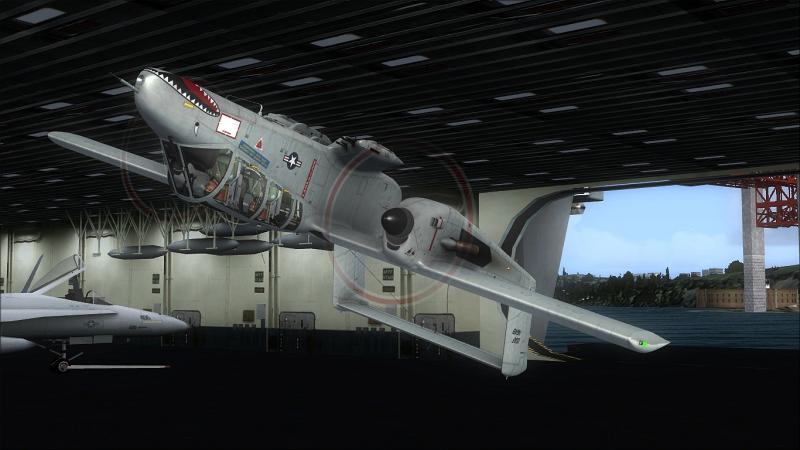
Just some Hangar buzzing... Wait... WHAT? Using the AS Bronco, and Javiers Nimitz Class Carriers with AICarriers. This wasn´t actually easy after some beer, quite some small opening there...
-
Wanted to add this one yesterday, but FS didn´t capture it, so I had to get it again, today, hope you like it, and good luck everyone! It is the AS Huey cruising above Berlin, taken in FSX Acceleration default scenery with the ENV series graphic enhancement.

-
Looks amazing! Great job there!
-
Im FSX quasi Standard Wetter, wenn man nur benutzerdefiniert einstellt, und die Sichtweite verändert, dann gilt das nur bis 8200+- ein bischen Fuß, da drüber ist Sichtweite unbeschränkt, würde also sagen, dass das mit deinen Wettereinstellungen zu tun hat.
-
Hehe, it´s very public at the university I study at, too! Often, when someone can´t solve a question you hear things like "Ah, I´ll just write 42..."
-
Lennart B. replied to Aerosoft Team [Inactive Account]'s topic in Videos & Screenshots, Screenshot contestsNah, that´s the Bomb Bay doors. Looks like the Martin 187 is correct.
-
Lennart B. replied to Aerosoft Team [Inactive Account]'s topic in Videos & Screenshots, Screenshot contestsWell, more like an A-20B, or an early G, without the rotating dorsal turret.
-
Lennart B. replied to Aerosoft Team [Inactive Account]'s topic in Videos & Screenshots, Screenshot contestsA-20G Havoc seen from the rear end?
-
Lennart B. replied to Aerosoft Team [Inactive Account]'s topic in Videos & Screenshots, Screenshot contestsFrom the angle I´d say there are two aircraft, but both the leading edge and the propellor of the lower part, as well as the jet intake on the upper part seem to belong to B-36 Peacemakers.
-
Lennart B. replied to Aerosoft Team [Inactive Account]'s topic in Videos & Screenshots, Screenshot contestsConvair B-36 Peacemaker?
-
Lennart B. replied to Aerosoft Team [Inactive Account]'s topic in Videos & Screenshots, Screenshot contestsFrom left to right: Pilsener, Weizen, Kölsch, Coke, Fanta, Sprite.... or wait... was it from right to left....?
-
Lennart B. replied to Aerosoft Team [Inactive Account]'s topic in Videos & Screenshots, Screenshot contestsAye Captain, heading for warpspeed!
-
I think the creator has a lot of history in R/C sims, if I remember correctly they do that stuff for many years. Don´t know how a flightsim of them might work.


