Skip to content

Abriael

Members
  • Joined

  • Last visited

  1. Wasn't that hard, was it? Thanks for the update. Next time, I pray you, communicate that "the MSFS 2024 version has been suspended due to outside issues" when you remove the mention from the store page, instead of doing it quietly.
  2. Hello Mathijs. Nice to see you back here I'm sorry, but I have to bring my fact-checking guns to bear on this, although I'm aware that you very likely didn't know the communication history on this, since you probably just looked at this thread and drew your conclusion that the update was not promised based exclusively on what is written here. Aerosoft 100% promised the MSFS 2024 update of this, and that promise is still available on their Discord in the very announcement of the upcoming release. https://discord.com/channels/1024582293563641916/1159617192644579398/1311345880942510240 "Regarding compatibility with the new Microsoft Flight Simulator 2024, we will provide an update within the next few weeks to ensure that the scenery is 100% compatible. Of course this update will be free!" But that is not all. The actual store page of the product included the following note at launch. "MSFS 2024 compatibility: An update will follow in the next few weeks, which will of course be free!" Said note has then been quietly removed without an explanation (which is not good. At all. Come on, Aerosoft. Be better), but the internet does not forget, and it's still visible on Webarchive. https://web.archive.org/web/20250421122258/https://www.aerosoft.com/it/negozio/flight/microsoft-flight-simulator/msfs-2020/msfs-sceneries/msfs-europa/4448/aerosoft-airport-milan-malpensa As you mention, David's absence from the discussion and Aerosoft's silence are telling. I think no one (at least no one sane) would hold David responsible if his attention has been diverted away by the situation in his country. Yet, Aerosoft is based in peaceful Germany. They have made the promises (I imagine based on what David told them), and it's their responsibility to communicate with users and tell them whether there is a problem, the extent of said problem, and whether they're doing anything to fix it. They're the company that sold an airport with a clearly labeled promise on it that has not been fulfilled. I don't think it's too much to ask that Aerosoft let users know the situation, and whether they can forget about the update and move on, or should still expect it and roughly when. Hells. I'd honestly like to hear whether David is safe at this point. That's more important than any airport.
  3. It's been quite a while. Any news on the MSFS 2024 front?
  4. Keep in mind that there's no way to limit stands to aircraft larger of a certain size. IE: you can make stands available only for smaller aircraft by limiting the radius of the ramp, or make it available only for specific airlines, or only to a specific type (ga, airliner, cargo, military), but you cannot make stands available for instance only to widebodies, or only to A380s.
  5. That is actually really funny. ANA is launching a direct 787 flight between Tokyo and Milan Malpensa (the first since Alitalia was shut down) in December and I'm scheduled to fly on it in January.
  6. Being my home airport, it's absolutely recognizable Good job
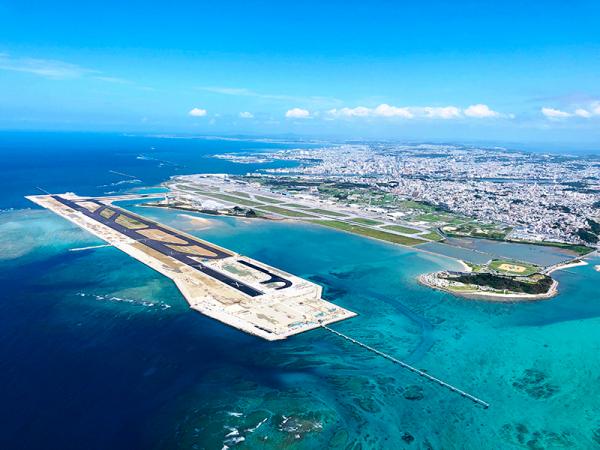
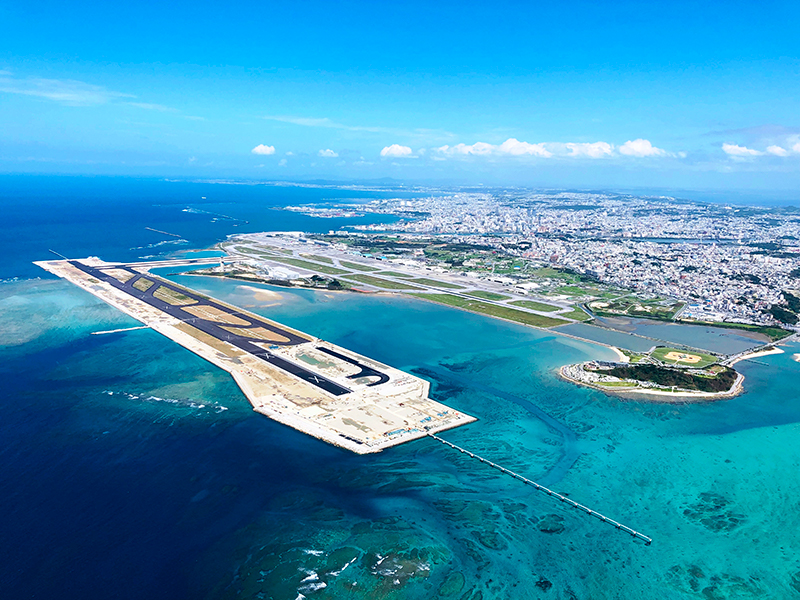
  7. What about Japan? Naha airport in Okinawa is one of the busiest in the country and it's completely borked in the sim due to outdated bing map data. It's missing a whole runway and the ortho is split in half because of older/newer photos, with the beautiful shallows surrounding the runways in disrepair. Who in their right mind would not want to land here?

Important Information

We have placed cookies on your device to help make this website better. You can adjust your cookie settings, otherwise we'll assume you're okay to continue. Privacy Policy & Terms of Use

Account

Navigation

Search

Search

Configure browser push notifications

Chrome (Android)
  1. Tap the lock icon next to the address bar.
  2. Tap Permissions → Notifications.
  3. Adjust your preference.
Chrome (Desktop)
  1. Click the padlock icon in the address bar.
  2. Select Site settings.
  3. Find Notifications and adjust your preference.