Skip to content

Scorpio47

Members
  • Joined

  • Last visited

  1. Just for information: I managed to contact the CEO of Justsim, Andrey Bakanov, and he confirmed that they are working on updates for ELLX and LFMN. As their developer lives in the Ukraine, they are having delays due to the ongoing war there unfortunately But there is hope..... Enjoy your weekend and all time thereafter Cheers Scorpio47
  2. Of course you are right, my bad! I was misled by Google though 😉 Thank you for your help and advice, I shall try to contact them and find out more.... Have a great weekend Cheers
  3. Google leads me to this link after "aerosoft EBBR XP",but it is a Justsim scenery: https://secure.simmarket.com/justsim-ebbr-brussels-airport-v.2-x-plane-11.phtml
  4. After nearly one year, still no answer...... Please, update that scenery for XP12 asap
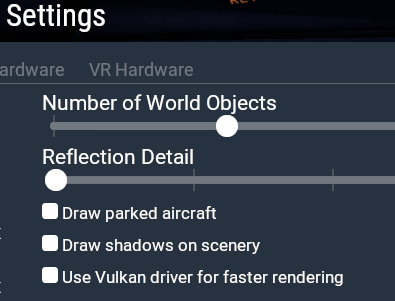
  5. Kein Problem, Micheal, wieso sollte ich beleidigt sein, wenn du denkst, daß ich eines dieser überteuerten Apple-Produkte nutze? 🙂 VulKan ist allerdings der Name des von Laminar und anderen genutzten Graphikverfahrens (Treiber) und ab XP12 per default eingeschaltet, bei XP11 kann man es noch anklicken... Siehe hier letzte Zeile
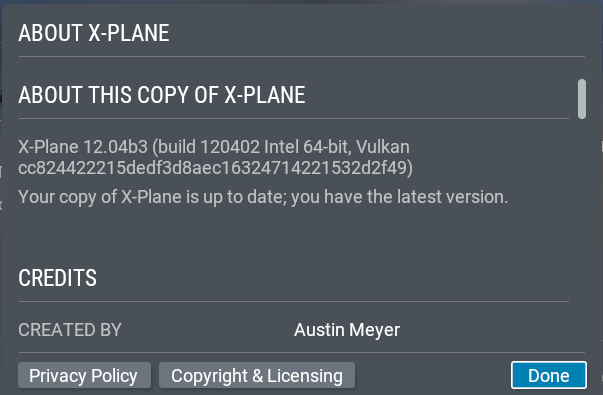
  6. ERFOLGSMELDUNG!!!!! Ich habe das update of die neueste Betaversion gemacht und siehe da, alles rennt ohne weitere Änderungen an der ini Datei problemlos. D A N K E an alle! Jürgen
  7. Liebe Freunde, leider habe ich immer noch mein altes Problem, obwohl ich inziwschen auch dank sei eurer Hilfe die berühmte Seite 6 des manuals gefunden, gelesen und angewendet habe. Übrigens besitze ich keinen MAC, auch kein iphone, oder sonstiges von Apple (außer ein altes ipad) und kann mir nicht erklären, wieso mein Bild von einem MAC stammen sollte, denn ich nutze XP12 nur unter WIndows10 und Linux Mint. Hier also die erste Fehlermeldung NACH Durchführung aller erforderlichen Schritte entsprechend den beiden readme Dateien und dem Manual Seite 6: Jedenfalls habe ich mich bemüht, kann aber nicht garantieren, ob ich nicht doch was ausgelassen oder übersehen habe. Darum hier denn auch gleich meine log-Datei für eure Kritik im Anhang. Ich hoffe sehr, daß ihr da was findet, so daß ich bald zusammen mit euch mich dieser tollen Szenerien erfreuen kann. D A N K E !!! Jürgen Log.txt
  8. Danke flightrookie, aber die kenne ich und befolge ich auch schon.... 😞 Kannst du mir sagen, welches manual gemeint ist? Also das mit der Seite 6... denn die finde ich leider nicht 😞
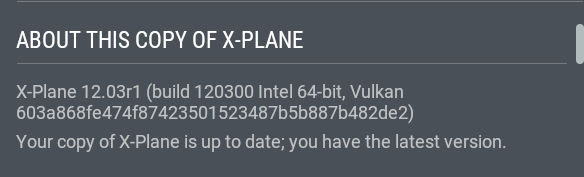
  9. Habe ich getan, allerdings kann ich die hier genannte Seite 6 nicht finden, zumal nicht klar ist, welches manual da gemeint ist: .... 3. after starting and ending X-Plane, you need to adjust the order of entries in scenery_packs.ini, refer manual page 6 for details. Wo kann ich diesen vermutlich wichtigen Hinweis finden,, bitte? P.S: Habe gerade nochmal gecheckt, meine Version ist offenbar zu alt, obwohl hier steht, sie sei die neueste- recht komisch....
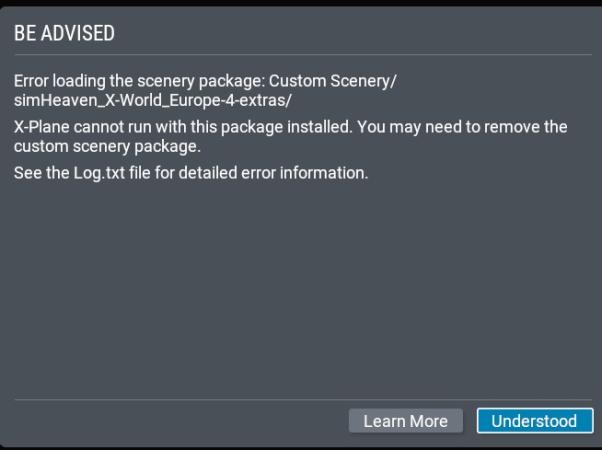
  10. Danke für die schnelle Reaktion, ich habe die alten logs nicht mehr, aber gerade eben die brandneue Version 2.1 von Europe aufgespielt und es geht genauso weiter. Ich hoffe, du findest die Ursache in meiner Datei.... Danke schon im voraus Jürgen Zitat daraus: +------------------------------------------------------------------------------- 0:07:37.367 E/SYS: | Error loading the scenery package: Custom Scenery/simHeaven_X-World_Europe-4-extras/ 0:07:37.367 E/SYS: | X-Plane cannot run with this package installed. You may need to remove the custom scenery package. 0:07:37.367 E/SYS: | See the Log.txt file for detailed error information. 0:07:37.367 E/SYS: | http://lookup.x-plane.com/_lookup_12_/broken_custom_scenery.html 0:07:37.367 E/SYS: | (REN_degree_loadtable.cpp:488) 0:07:37.367 E/SYS: +------------------------------------------------------------------------------- Log.txt
  11. I am very sorry to say that I have not managed to get these packages to work both in XP11 and in XP12 so far. All I get is errors announcing that one and then the other cannot be loaded, going on until all have been listed. Only the vegetation library does not generate that error. What am I doing wrong? Thank you for some tips and hints Juergen

Important Information

We have placed cookies on your device to help make this website better. You can adjust your cookie settings, otherwise we'll assume you're okay to continue. Privacy Policy & Terms of Use

Account

Navigation

Search

Search

Configure browser push notifications

Chrome (Android)
  1. Tap the lock icon next to the address bar.
  2. Tap Permissions → Notifications.
  3. Adjust your preference.
Chrome (Desktop)
  1. Click the padlock icon in the address bar.
  2. Select Site settings.
  3. Find Notifications and adjust your preference.