Skip to content

Captain Gunadeep

Members
  • Joined

  • Last visited

  1. kaustubh started following Captain Gunadeep
  2. Rishabh Lal started following Captain Gunadeep
  3. csiaspotter8 started following Captain Gunadeep
  4. kaustubh12 started following Captain Gunadeep
  5. Varas Patel started following Captain Gunadeep
  6. suman hembram started following Captain Gunadeep
  7. Rosh87 started following Captain Gunadeep
  8. sravan started following Captain Gunadeep
    • 666 downloads
    • Version 1.0.0
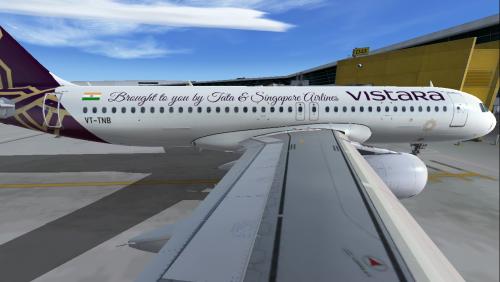
    Vistara Airlines first Airbus A320-251N registered VT-TNB. Compatible with Aerosoft Livery Manager
    • 661 downloads
    • Version 1.0.0
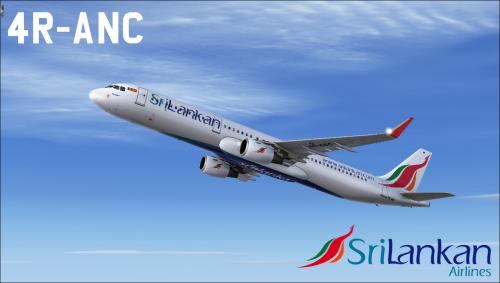
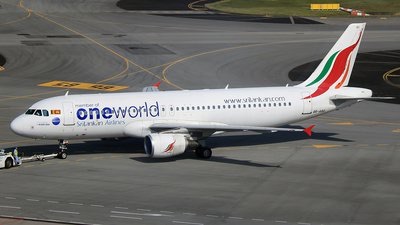
    Sri Lankan Airlines first Airbus A321-251N registered 4R-ANC. Compatible with Aerosoft Livery Manager
    • 789 downloads
    • Version 1.0.0
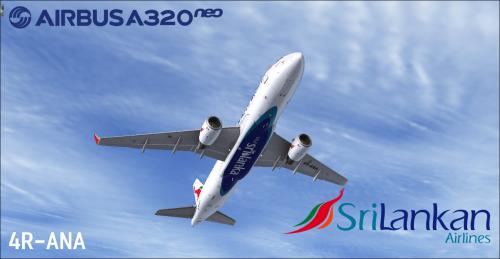
    Sri Lankan Airlines first Airbus A320-251N registered 4R-ANA. Compatible with Aerosoft Livery Manager
  9. before adding that Please move Aircraft.cfg to Desktop and then add those lines and save it. and then move back the Aircraft.cfg file to Aircraft folder.
  10. Fixed this Glitch. Please download the updated textures.Please remove the pre-installed textures and install this
    • 2976 downloads
    • Version 2.1.0
    This ZIP - file contains repaints in the colors of Airbus A321 CFM Air Canada New Livery C-GJWI (clean and dirt). These textures can be used for the Airbus X and the Airbus X Extended! Repaint by Captain Gunadeep, based on the Aerosoft paintkit. Compatible with Aerosoft Livery Manager
    • 355 downloads
    • Version 1.0.0
    Visit http://www.newxtrend.com for more Liveries Balkan Holidays BH Air Airbus A320-214 CFM livery painted for Airbus A320 IAE To install this aircraft manually, Copy the following text into your 'aircraft.cfg', inside the folder 'SimObjects\Airplanes\Aerosoft Airbus X A320 Extended CFM'. Replace the Xx in [FLTSIM.XX] by the following number in your Aircrafts List This is for Aerosoft Airbus X Extended [fltsim.xx] <<-- Replace 'xx' with the following Number title = Airbus A320 BH AIr LZ-BHC sim = A320 model = panel = sound = texture = LZBHC kb_checklists = AirbusA321_check kb_reference = AirbusA321_ref atc_id = LZ-BHC atc_airline = BALKAN HOLIDAYS atc_flight_number = ui_manufacturer = Airbus ui_type = A320-214 CFM ui_variation = BH Air ui_typerole = Commercial Airliner ui_createdby = Aerosoft atc_parking_types = GATE description = Airbus X Extended - A320 CFM Balkan Holidays BH AIr LZ-BHC by Captain Gunadeep This is for Airbus X v1.31 Users To install this aircraft manually, Copy the following text into your 'aircraft.cfg', inside the folder 'SimObjects\Airplanes\Aerosoft Airbus X A320 CFM'. Replace the XX in [FLTSIM.XX] by the following number in your Aircrafts List [fltsim.xx] <<-- Replace 'xx' with the following Number title = Airbus A320 BH Air LZ-BHC sim = A320 model = panel = sound = texture = LZBHC kb_checklists = AirbusA321_check kb_reference = AirbusA321_ref atc_id = LZ-BHC atc_airline = BALKAN HOLIDAYS atc_flight_number = ui_manufacturer = Airbus ui_type = A320-214 CFM ui_variation = BH Air ui_typerole = Commercial Airliner ui_createdby = Aerosoft atc_parking_types = GATE description = Airbus X - A320 CFM Balkan Holidays LZ-BHC by Captain Gunadeep for Airbus X V1.31 [users not the EXTENDED Model] Replace the texture.cfg file in this texture with the following Lines [fltsim] fallback.1=..\..\Aerosoft Airbus A320_A321 Base\Texture_Fallback_VC fallback.2=..\..\Aerosoft Airbus A320_A321 Base\Texture_FallBack_A320 //fallback.2=..\..\Aerosoft Airbus A320_A321 Base\Texture_FallBack_A321 fallback.3=..\..\..\..\Scenery\Global\texture fallback.4=..\..\..\..\..\..\Scenery\Global\texture and its done.
    • 1023 downloads
    • Version 1.0.0
    As the maximum limit to upload a file here is exceeded. I uploaded the full IndiGo Airlines Airbus A320 Fleet in my own website. Download the 368mb file of full 130 liveries of IndiGo Airlines here. Total file size is 368mb. If you couldn't download full zip file. read below. If there is any problem related to download. Please Visit the link below to get the alternate download options of GOOGLE DRIVE and MEGA.NZ For Installation Instructions Visit this page here. http://www.newxtrend.com/aviation/indigo-airlines-full-fleet-130-aircrafts-aerosoft-airbus-x/
  11. Please I'm not aware of pmdg forum. If you have any link please share.
    • 282 downloads
    • Version 1.0.0
    Apologies for a PMDG Livery here. It's done on Request. IndiGo B737-800WL HD Livery for PMDG 737 NGX To install this aircraft manually, Copy the following text into your 'aircraft.cfg', inside the folder 'SimObjects\Airplanes\PMDG 737-800NGX WL'. Replace the XX in [FLTSIM.XX] by the following number in your Aircrafts List [fltsim.xx] <<-- Replace 'xx' with the following Number title=Boeing 737-8Q8NGX IndiGo sim=B737-800WL model= panel= sound= texture=IndiGo_VT-FLY kb_checklists=Boeing737-800_check kb_reference=Boeing737-800_ref atc_airline=IndiGo atc_id=VT-FLY atc_flight_number=422 atc_model=737-800 atc_parking_types=GATE,RAMP atc_type=BOEING ui_createdby=PMDG ui_manufacturer=Boeing ui_type=737-800NGX ui_typerole=737-800 ui_variation=IndiGo Winglets airline_name=IndiGo description=Boeing 737-800 powered by CFM engines v 1.0\nPMDG Simulations\nwww.precisionmanuals.com \n\nProduced under license from Boeing Management Company.\n\nBoeing 737, 737-800 & Boeing are among the trademarks owned by Boeing. visual_damage=0 PMDG_Version=1 // **DO NOT EDIT THIS LINE - PMDG OPERATIONS CENTER USE ONLY**

Important Information

We have placed cookies on your device to help make this website better. You can adjust your cookie settings, otherwise we'll assume you're okay to continue. Privacy Policy & Terms of Use

Account

Navigation

Search

Search

Configure browser push notifications

Chrome (Android)
  1. Tap the lock icon next to the address bar.
  2. Tap Permissions → Notifications.
  3. Adjust your preference.
Chrome (Desktop)
  1. Click the padlock icon in the address bar.
  2. Select Site settings.
  3. Find Notifications and adjust your preference.