


Jump to content

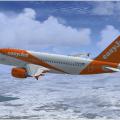
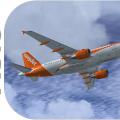
Airbus A319 CFM easyJet G-EZDE 1.00

(15 reviews)

3 Screenshots

Contents of this ZIP-package:

Airbus A319 CFM easyJet G-EZDE

(clean and dirt)

Repaint by:

Holger Sobl

Aerosoft paintkit by:

Stefan Hoffmann

Installation (Airbus Livery Manager):

Start the aerosoft Airbus Livery Manager and drag the ZIP-File into the list - or click "Add Livery" and select the desired file. You get a preview of the new livery - and install it with just one click. (You can read all Livery Manager functions by clicking the "?" button!)

If you are looking for more or other repaints then you can also look on my homepage http://simtexture.de!

User Feedback

You may only provide a review once you have downloaded the file.


Nothing better, thank you!


The livery it self is on point, but i've got a problem with a319, and it's only appearing with this livery so. When i turn on the beacon, landing and taxi lights, then there is no light when i look outside. The same happens when i connect the aircraft to the GPU, chocks and cones, i can't see them when outside.


Anyone got a solution?


//Jónas

   10 of 10 members found this review helpful 10 / 10 members

I cannot find fault with this repaint. I love it.

   4 of 4 members found this review helpful 4 / 4 members

   3 of 3 members found this review helpful 3 / 3 members

   2 of 3 members found this review helpful 2 / 3 members

   0 of 1 member found this review helpful 0 / 1 member

   1 of 2 members found this review helpful 1 / 2 members

   0 of 1 member found this review helpful 0 / 1 member

   0 of 1 member found this review helpful 0 / 1 member

   0 of 1 member found this review helpful 0 / 1 member

   0 of 1 member found this review helpful 0 / 1 member

   0 of 1 member found this review helpful 0 / 1 member

   0 of 1 member found this review helpful 0 / 1 member

Important Information

We have placed cookies on your device to help make this website better. You can adjust your cookie settings, otherwise we'll assume you're okay to continue. Privacy Policy & Terms of Use

Account

Navigation

Search

Configure browser push notifications

Chrome (Android)
  1. Tap the lock icon next to the address bar.
  2. Tap Permissions → Notifications.
  3. Adjust your preference.
Chrome (Desktop)
  1. Click the padlock icon in the address bar.
  2. Select Site settings.
  3. Find Notifications and adjust your preference.