Skip to content

Holgi

Expert
  • Joined

  • Last visited

  1. Nasoulis413 started following Holgi
  2. Dipak Routray started following Holgi
  3. nandokin started following Holgi
  4. Caleb Loftus started following Holgi
  5. Alehio08 started following Holgi
  6. Michel Champion started following Holgi
  7. Rafael Tsolakidis started following Holgi
  8. armando jose mojica gil started following Holgi
  9. uvboss started following Holgi
  10. Andreww started following Holgi
    • 69 downloads
    • Version 1.0.0
    Contents of this ZIP-package: CRJ550ER airbierlin D-BEER (fictional) Repaint by: Holger Sobl Aerosoft paintkit by: Stefan Hoffmann Livery – Installation Guide 1) Locate your MSFS Content folder. That’s the folder you chose on the update screen whenyou first started MSFS. I will use [MSFS] as a placeholder for this. 2) Unzip the contents of this file into your [MSFS]\Community folder. 3) Start MSFS, enter the world menu, select the Aircraft, your new livery and a departure airport, then click FLY! Acknowledgements: The blanks used as a basis for this repaint are by Aerosoft/Digital Aviation. Thank you for the wonderful model and the great paintkit. Thank you Hans. Legal Stuff: This repaint is released as FREEWARE. You may use and modify it in any way you wish, but you may NOT use it in any kind of money-making endeavor, and you may NOT publicly distribute any copies of it, whether modified or not, without my permission. Holgi @ simtexture.de
    • 438 downloads
    • Version 1.0.0
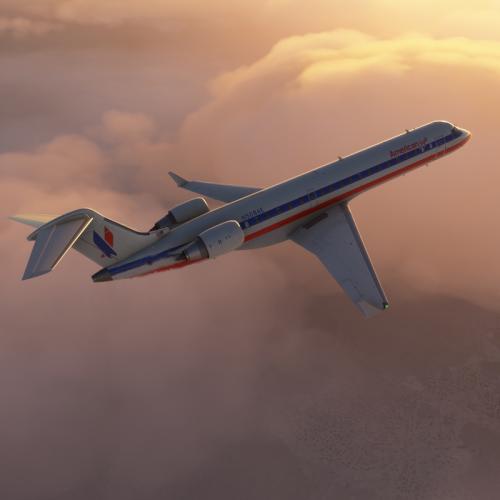
    Contents of this ZIP-package: CRJ700ER American Eagle N508AE OC Repaint by: Holger Sobl Aerosoft paintkit by: Stefan Hoffmann Livery – Installation Guide 1) Locate your MSFS Content folder. That’s the folder you chose on the update screen whenyou first started MSFS. I will use [MSFS] as a placeholder for this. 2) Unzip the contents of this file into your [MSFS]\Community folder. 3) Start MSFS, enter the world menu, select the Aircraft, your new livery and a departure airport, then click FLY! Acknowledgements: The blanks used as a basis for this repaint are by Aerosoft/Digital Aviation. Thank you for the wonderful model and the great paintkit. Thank you Hans. Legal Stuff: This repaint is released as FREEWARE. You may use and modify it in any way you wish, but you may NOT use it in any kind of money-making endeavor, and you may NOT publicly distribute any copies of it, whether modified or not, without my permission. Holgi
    • 195 downloads
    • Version 1.0.0
    Contents of this ZIP-package: CRJ550ER Privat OE-AMM (fictional) Repaint by: Holger Sobl Aerosoft paintkit by: Stefan Hoffmann Livery – Installation Guide 1) Locate your MSFS Content folder. That’s the folder you chose on the update screen whenyou first started MSFS. I will use [MSFS] as a placeholder for this. 2) Unzip the contents of this file into your [MSFS]\Community folder. 3) Start MSFS, enter the world menu, select the Aircraft, your new livery and a departure airport, then click FLY! Acknowledgements: The blanks used as a basis for this repaint are by Aerosoft/Digital Aviation. Thank you for the wonderful model and the great paintkit. Thank you Hans. Legal Stuff: This repaint is released as FREEWARE. You may use and modify it in any way you wish, but you may NOT use it in any kind of money-making endeavor, and you may NOT publicly distribute any copies of it, whether modified or not, without my permission. Holgi
    • 172 downloads
    • Version 1.0.0
    Contents of this ZIP-package: CRJ700ER Ryanair 9H-FUQ (fictional) Repaint by: Holger Sobl Aerosoft paintkit by: Stefan Hoffmann Livery – Installation Guide 1) Locate your MSFS Content folder. That’s the folder you chose on the update screen whenyou first started MSFS. I will use [MSFS] as a placeholder for this. 2) Unzip the contents of this file into your [MSFS]\Community folder. 3) Start MSFS, enter the world menu, select the Aircraft, your new livery and a departure airport, then click FLY! Acknowledgements: The blanks used as a basis for this repaint are by Aerosoft/Digital Aviation. Thank you for the wonderful model and the great paintkit. Thank you Hans. Legal Stuff: This repaint is released as FREEWARE. You may use and modify it in any way you wish, but you may NOT use it in any kind of money-making endeavor, and you may NOT publicly distribute any copies of it, whether modified or not, without my permission. Holgi
    • 278 downloads
    • Version 1.0.0
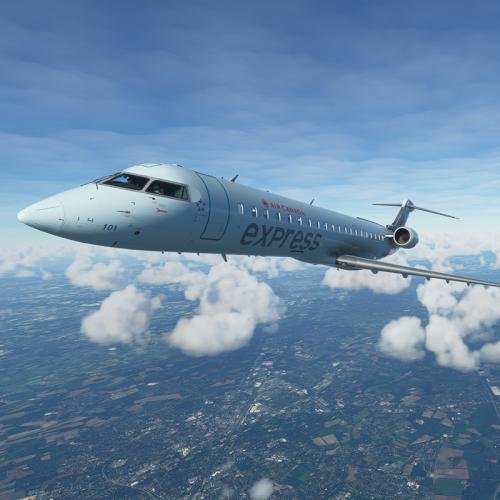
    Contents of this ZIP-package: CRJ700ER Air Canada Express C-GOJA (fictional) Repaint by: Holger Sobl Aerosoft paintkit by: Stefan Hoffmann CRJ Livery – Installation Guide 1) Locate your MSFS Content folder. That’s the folder you chose on the update screen whenyou first started MSFS. I will use <MSFS> as a placeholder for this. 2) Unzip the contents of this file into your <MSFS>\Community folder. 3) Start MSFS, enter the world menu, select the CRJ, your new livery and a departure airport, then click FLY! Acknowledgements: The blanks used as a basis for this repaint are by Aerosoft/Digital Aviation. Thank you for the wonderful model and the great paintkit. Thank you Hans. Legal Stuff: This repaint is released as FREEWARE. You may use and modify it in any way you wish, but you may NOT use it in any kind of money-making endeavor, and you may NOT publicly distribute any copies of it, whether modified or not, without my permission. Holgi
  11. Which version of the airbus do you use?
  12. My AIR TRANSAT is ready for takeoff ... ... I know, she is not perfect but I like her. DOWNLOAD
    • 847 downloads
    • Version 1.0.0
    Air Transat C-GTSO REPAINT BY: Holger Sobl AEROSOFT PAINTKIT BY: Stefan Hoffmann INSTALLATION: 1. Unzip to a temporary location. 2. Copy the "texture.CGTSO" folder in this file to your "Aerosoft A333 RR Professional" folder. 3. Copy and paste the following text into the "aircraft.cfg" file inside the "Aerosoft A333 RR Professional" folder. (replacing the X with the next number in line after your last existing paint scheme - if the last paint scheme already on the list is [FLTSIM.2], this should be [FLTSIM.3]) [FLTSIM.X] title = Aerosoft A333 professional Air Transat C-GTSO sim = A330-343 model = panel = sound = texture = CGTSO kb_checklists = AirbusA333_check kb_reference = AirbusA333_ref atc_id = C-GTSO atc_airline = TRANSAT atc_flight_number = 1000 ui_manufacturer = Airbus ui_type = A330-343 ROLLS-ROYCE ui_variation = Air Transat ui_typerole = Commercial Airliner ui_createdby = Aerosoft atc_parking_types = GATE,RAMP atc_parking_codes = TS description = Airbus A330 - 343 RR / Air Transat C-GTSO \nwww.aerosoft.com \nRepaint by Holger Sobl (simtexture.de)\n\n If you are looking for more or other repaints then you can also look on my homepage http://simtexture.de! ACKNOWLEDGEMENTS: The blanks used as a basis for this repaint are by Aerosoft. Thank you for the wonderful model and the great paintkit. LEGAL STUFF: This repaint is released as FREEWARE. You may use and modify it in any way you wish, but you may NOT use it in any kind of money-making endeavor, and you may NOT publicly distribute any copies of it, whether modified or not, without my permission. Holgi
  13. Merry Christmas and a little preview of the AIR TRANSAT.
  14. Now for all Turkish Airline Pilots … DOWNLOAD
    • 1401 downloads
    • Version 1.0.0
    Turkish Airlines TC-LOE REPAINT BY: Holger Sobl AEROSOFT PAINTKIT BY: Stefan Hoffmann INSTALLATION: 1. Unzip to a temporary location. 2. Copy the "texture.TCLOE" folder in this file to your "Aerosoft A333 RR Professional" folder. 3. Copy and paste the following text into the "aircraft.cfg" file inside the "Aerosoft A333 RR Professional" Folder. (replacing the X with the next number in line after your last existing paint scheme - if the last paint scheme already on the list is [FLTSIM.2], this should be [FLTSIM.3]) [FLTSIM.X] title = Aerosoft A333 professional Turkish Airlines TC-LOE sim = A330-343 model = LH panel = sound = texture = TCLOE kb_checklists = AirbusA333_check kb_reference = AirbusA333_ref atc_id = TC-LOE atc_airline = TURKISH atc_flight_number = 1000 ui_manufacturer = Airbus ui_type = A330-343 ROLLS-ROYCE ui_variation = Turkish Airlines ui_typerole = Commercial Airliner ui_createdby = Aerosoft atc_parking_types = GATE,RAMP atc_parking_codes = TK description = Airbus A330 - 343 RR / Turkish Airlines TC-LOE \nwww.aerosoft.com \nRepaint by Holger Sobl (simtexture.de)\n\n If you are looking for more or other repaints then you can also look on my homepage http://simtexture.de! ACKNOWLEDGEMENTS: The blanks used as a basis for this repaint are by Aerosoft. Thank you for the wonderful model and the great paintkit. LEGAL STUFF: This repaint is released as FREEWARE. You may use and modify it in any way you wish, but you may NOT use it in any kind of money-making endeavor, and you may NOT publicly distribute any copies of it, whether modified or not, without my permission. Holgi
  15. ... there are a few more small things to do and Turkish Airlines will be the next one of mine. Here's a little taste ...
    • 1597 downloads
    • Version 1.0.0
    Contents of this ZIP-package: Airbus A320 Tunisair TS-IMW (CFM Sharklets) (clean and dirt) Repaint by: Holger Sobl Stefan Hoffmann Aerosoft paintkit by: Stefan Hoffmann Installation (Airbus Livery Manager): Start the aerosoft Airbus Livery Manager and drag the ZIP-File into the list - or click "Add Livery" and select the desired file. You get a preview of the new livery - and install it with just one click. (You can read all Livery Manager functions by clicking the "?" button!) If you are looking for more or other repaints then you can also look on my homepage http://simtexture.de!
    • 2609 downloads
    • Version 1.0.0
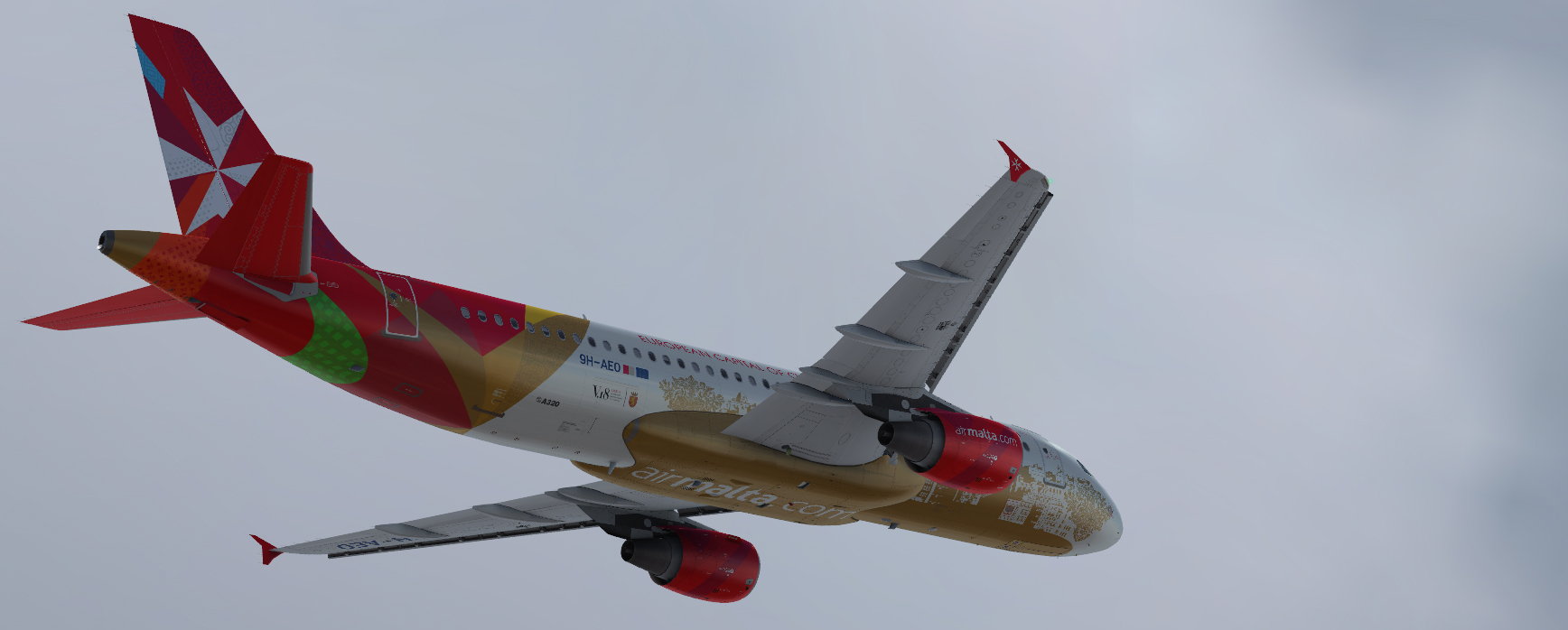
    Contents of this ZIP-package: Airbus A320 AIR MALTA 9H-AEO (clean and dirt) Repaint by: Holger Sobl Aerosoft paintkit by: Stefan Hoffmann Installation (Airbus Livery Manager): Start the aerosoft Airbus Livery Manager and drag the ZIP-File into the list - or click "Add Livery" and select the desired file. You get a preview of the new livery - and install it with just one click. (You can read all Livery Manager functions by clicking the "?" button!) If you are looking for more or other repaints then you can also look on my homepage http://simtexture.de!
    • 286 downloads
    • Version 1.0.0
    Contents of this ZIP-package: Bombardier CRJ700ER Duo Airways G-DUOA Repaint by: Holger Sobl Aerosoft paintkit by: Stefan Hoffmann Installation (CRJ Livery Manager): Start the Aerosoft/Digital Aviation CRJ Livery Manager and drag the ZIP-File into the list - or click "Add Livery" and select the desired file. You get a preview of the new livery - and install it with just one click. (You can read all Livery Manager functions by clicking the "?" button!) The entry for the aircraft.cfg: [FLTSIM.X] title=CRJ700ER Duo Airways G-DUOA sim=CRJ700_AMM model= panel= sound= texture=VB_G-DUOA kb_checklists=BombardierCRJ700_check kb_reference=BombardierCRJ700_ref atc_id=G-DUOA atc_airline=FLY DUO atc_parking_types=GATE,RAMP ui_manufacturer="Bombardier" ui_type="CRJ700ER" ui_variation="Duo Airways" ui_typerole="Regional Jet" ui_createdby="Aerosoft/Digital Aviation" description="CRJ700ER/Duo Airways G-DUOA\nwww.aerosoft.com\nRepaint by Holger Sobl (simtexture.de / Holgi)\n\nThe CRJ (Canadair Regional Jet) family of aircraft was derived from the Canadair Challenger business jet, which began its operational life as the LearStar 600. The Bombardier Canadair CRJ700, which entered service in 2001, is a stretched version of the CRJ100/200 regional jet, with increased seating capacity from 50 to 70. With increased length and upgraded landing gear, the CRJ700 features a longer wing span and leading edge slats. Like other members of the CRJ family, the CRJ700 features an electronic flight instrument system (EFIS) avionics suite and “glass cockpit” instrumentation." category=airplane Acknowledgements: The blanks used as a basis for this repaint are by Aerosoft/Digital Aviation. Thank you for the wonderful model and the great paintkit. Thank you Hans. Legal Stuff: This repaint is released as FREEWARE. You may use and modify it in any way you wish, but you may NOT use it in any kind of money-making endeavor, and you may NOT publicly distribute any copies of it, whether modified or not, without my permission. Holgi

Important Information

We have placed cookies on your device to help make this website better. You can adjust your cookie settings, otherwise we'll assume you're okay to continue. Privacy Policy & Terms of Use

Account

Navigation

Search

Search

Configure browser push notifications

Chrome (Android)
  1. Tap the lock icon next to the address bar.
  2. Tap Permissions → Notifications.
  3. Adjust your preference.
Chrome (Desktop)
  1. Click the padlock icon in the address bar.
  2. Select Site settings.
  3. Find Notifications and adjust your preference.