Jump to content

Christopher Barbas

Members
  • Joined

  • Last visited

Everything posted by Christopher Barbas

  1. AES NG - Progress Hi, is there any progress or news available about it, thanks.
  2. I have no luck! I have an old version and that's the problem. I must buy new I think!
  3. Yes thats all good. What I am asking is something else, where is the update? I cannot see it at support, I am seeing only the v2.01! Could it be because I have bought it from the old shop!?
  4. Hm There is not an update for FS2004 version there, can you please confirm that? Also if I am understanding correct, if I download the version v2.01 again , this includes the update within, is that correct? I am always speaking for FS2004. Thanks
  5. MA Frankfurt - new runway, new update! Good day There is this post at Aerosoft front page, MA Frankfurt - new runway, new update! Wednesday, 09.11.2011 An update for Mega Airport Frankfurt is waiting for you in our support database. As of the 21st October 2011 Frankfurt has taken the new north-westerly runway 07L/25R into service. The new aerial images in high resolution from the 1st Sept. 2011 for the airport will be the foundation of the complete new version of Mega Airport Frankfurt which is in progress. To make sure that all users of MA Frankfurt can use the new runway until the airports completion, we have made this temporary update for MAF 2008 available. Please note: The latest version of MAF needs to be installed for this update! Links: [support-database] [Product page] Aerosoft - Mega Airport Frankfurt but the the download version is the same as before, version v2.01 and also at support page can be found the same! Is the update included? Should the already installed version deleted and installed again new? Thanks
  6. You can't it's not working like this at Airbus, HDG or "Direct To" from FMGS.
  7. Good day Thanks for the change, it seems that you are listening here and that's great. Regards
  8. Hi Otto Thanks, I have all the freeware and payware ITALY scenery for FS9, that's not the problem. I don't fly the FSX but that's another story. I would like to see high quality airports sceneries like AEROSOT's for ITALY. It's a shame that there is nothing for capital city's airport for example! About piracy, yes I agree but that's also another story. It's all around money at the end? what about the hobby? We all have missed something here! Thanks
  9. Hi I have just searched the forum about it "Italy scenery", I am just curious why there isn't any, is there any plans. Italy has been "forgotten" from scenery developers and that's very very very strange!!!
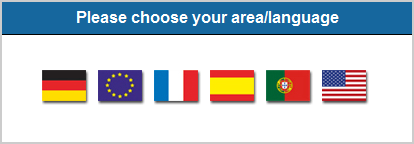
  10. Hi Actually that's what I wanted to mention, it's already talked by some here. If it's about the VAT options and so on, it can be selected lately at eshop by the members. It would me nicer and more polite for customers/members to select the "English" flag as language for browsing Aerosoft, instead of a "Europe" flag which brings up the pages at English. Thanks
  11. Please choose your area/language Hi, this screenshot is from the main Aerosoft main weblink which has the Europe flag as a selection of language or area. Europe is an area but is not a selection of language. The European official languages are 23 in count. In other words it doesn't mean that if someone is from Europe has to talk English as it is at your selection. I think it will be better this Europe flag to be removed, also the word "area" has nothing to offer there. Thanks
  12. Hi you can find a lot off about this isuue at FlyTampa forums. Regards
  13. Hi Search and install also this dll "dx7vb.dll", make sure you are using the latest airac file also.
  14. Good day Check FS Flight Keeper forum, there is something about it but I think if you just use the latest FSFK version you will not have this problem(like me, it works). Another think to remember, if you are using the latest FSK version, is to select the correct pilot and logbook just after you start FSFK. Doing that later is not working, you will have to restart FSFK again. Regards
  15. For the record I have try also to contact the FSNET developer about it but he has not respond at all. They don't have a support forum either. Thanks
  16. Good day Oliver I think your suggestion has worked 100%. I am into FS9 for over 5 min without any CTD. That's what I have done following your suggestion, I have installed again the FSNET and here is the "VistaMare About", without to run AES help at first, as you said it reduces the already installed version of it to another and of course I had only a par seconds to make the screen before the simulator has CTD. Then I have opened AES help and restarted again the FS9, the following screen is showing that the AES has updated the "VistMare About", Thank you very much for the support, I think the problem is solved so far!
  17. Hi Oliver First of all thanks. Is that what we are talking about, This is what I have without the "Airsimmer" and "FSNET" installed. I'll install tomorrow FSNET again and tell you exactly what is happening. Thanks
  18. AES And Airsimmer/gates.to/FSNET Compatibility Hi all I am into this problem a lot of times but today I've decided to write here about it! I am a member of the so called "Airsimmer Extended team", ok its not at interest of Aerosoft I know but I have a specific problem which I would like if it is possible to be investigated, I will explain why of course. Every time I am installing the Airsimmer Extended Team Version Airbus, to give it one more try, without success 99% of it, the usual problems CTD after departure etc, deciding after to un-install the aircraft having always the same problem which is(after un-installing the aircraft), when I run FS9 and click fly, if I am at an airport with AES support, I've always have CTDs after a seconds in cockpit. The only solution that I am able to find was to re-install AES and then everything is getting back to normal. The problem does not occurs if after I click fly go to an airport without AES support but its coming alive if a make a small flight from an airport without AES to an airport with AES, whan I am closing the airport with AES support, again FS9 crashes. Exactly the same problem is happening with gates.to/FSNET. As I said the only solution I have find is to re-install AES again. Thanks
  19. Good day Tony urgent, I have just discovered that the real operator Aegean Airlines will add more flights to Larnaca at summer '11 company schedule flight's. Thus there are the LGAV-LCLK and LGTS-LCLK both with returns of course, available, will come up with flights from Zakynthos, Chania, Iraklion, Santorini, Rhodos and Mikonos for the summer schedule. It will be a great opportunity for us (not only of course), Aegean Airlines Virtual, simulating real world airline operations to have this scenery available before summer. Just push it(release of FS9 v) Thanks
  20. By me too Works fine with airac 0912. Regards
  21. Hi Yes I have and you are right. Same think happened to my fiend also after updating the FMC database from Navigraph, he had a '09 airac, after updating, has the same error. I have not check it yet but I think that causes the problem. I'll test it and I'll inform you. Regards
  22. Oh is that true ! I'll check it. Thank & Happy New Year 2010
  23. Good day & Merry Christmas I am receiving this error message from FMC, any suggestions. Thanks in advance
  24. Hallo Thank you Shaun, I have sen Thomas replay. I have to disable all, firewall, antivirus etc. bot no luck at all. I have also reinstall FSFK, same. Thanks
  25. INET - Code 12002 Hi all I have a problem to upload my FSFK pirep to our flight operation center. That happens every time since a month now. Our flight operation center web master, our flight operation center has investigate the FOC servers and everything is ok. Any Help Thanks in advance

Important Information

We have placed cookies on your device to help make this website better. You can adjust your cookie settings, otherwise we'll assume you're okay to continue. Privacy Policy & Terms of Use

Account

Navigation

Search

Configure browser push notifications

Chrome (Android)
  1. Tap the lock icon next to the address bar.
  2. Tap Permissions → Notifications.
  3. Adjust your preference.
Chrome (Desktop)
  1. Click the padlock icon in the address bar.
  2. Select Site settings.
  3. Find Notifications and adjust your preference.