

About This File
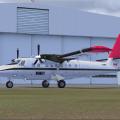
This repaint is for the Aerosoft Twin Otter Extended. This repaint represents a Twin Otter that was operated by Bradley Air Services and the livery is that which was used during 1980's thru to the late 1990'S. The aircraft was normally operated in the Canadian Arctic and was usually based in CYFB Iqaluit. It was operated in the following configurations: Wheel skis, tundra tires and the regular tires depicted in this model.
Please add the following text to your aircraft.cfg after the last fltsim number and change the X to the next number in the sequence. The aircraft.cfg file can be found located in your Microsoft Flight Simulator X\Simobjects\Airplanes\Aerosoft_DHC6_300 WHEEL folder.
Paste the tecture folder in the same folder
That should be it, please enjoy!
------------------------------
[Fltsim.X]
title=Aerosoft DHC-6 Series 300 Wheels BAS
sim=DHC-6.300.W
model=3bladewheelcargo
panel=
sound=
texture=CGNDO
kb_checklists=
kb_reference=
atc_id=GNDO
atc_parking_types=RAMP
ui_manufacturer="de Havilland Canada"
ui_type="DHC-6-300 Wheels"
ui_variation="Bradley Air Services 90s"
ui_typerole="Twin Engine TurboProp"
ui_createdby="Aerosoft"
atc_airline=FAB
atc_flight_number=
description=
-------------------------------------
User Feedback
You may only provide a review once you have downloaded the file.