Skip to content

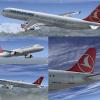
Airbus A321 Turkish Airlines TC-JRT 1.0

1 Screenshot

This ZIP-file contains two repaints for the Aerosoft Airbus X package, in the colors of Airbus A321 Turkish Airlines TC-JRT (clean and dirt).


... more repaints on my homepage http://simtexture.de !

User Feedback

Recommended Comments

iAkmal

Members

Hello Holgi,

Just wanted to say your repaints are excellent use some of your other ones too!

When I install this livery I had a few problems. I had the "failed to startup flight model" error though I managed to fixed that. After that I had this problem http://prntscr.com/5xg4p4 and I even did the fix you suggested to do the SHARKLET change in the aircraft cfg. Any other suggestions? I have the new Aerosoft A321 v1.21 update.

+++

I googled: Aerosoft livery compatibility, and came across Mathjis's post on how to fix the problem using the texture.zip and replacing the file and that didn't work :(

emir

Members

I downloaded it and it didn't work on my pc. It has no reflections and it has a black vc.

celal50

Members

it is not working. I have a dark plane and a black cockpit???????????

Holgi

Expert

  • Expert
vor 58 Minuten, celal50 sagte:

it is not working. I have a dark plane and a black cockpit???????????


... look here

celal50

Members

YES!! THANKS HOLGI!! IT WORKS :D

Johannes1

Members

It's completely black the hole livery and if you go to the cockpit there isn't anything your able to see!


Yes help me please I did everything as it is explained in the instructions.

Create an account or sign in to comment

Important Information

We have placed cookies on your device to help make this website better. You can adjust your cookie settings, otherwise we'll assume you're okay to continue. Privacy Policy & Terms of Use

Account

Navigation

Search

Search

Configure browser push notifications

Chrome (Android)
  1. Tap the lock icon next to the address bar.
  2. Tap Permissions → Notifications.
  3. Adjust your preference.
Chrome (Desktop)
  1. Click the padlock icon in the address bar.
  2. Select Site settings.
  3. Find Notifications and adjust your preference.