Skip to content

Commuter Airliners

In this section you will find 3rd party repaints for the Eurowings Commuter Airliners from Aerosoft.

6 files
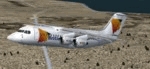
  1. *************
    British European BAe 146-200 "G-JEAW"
    for Eurowings Professional
    FS2002
    *************

    Repaint by David Baty

    **INSTALLATION**
    1.
    Extract the archive to a temporary folder and copy the file Texture.be2
    to your EW BAe146-200 folder.

    2.
    Add the following lines to the aircraft.cfg
    Replace the X in [flightsim.X] to the next number in series.

    -------Cut Below-------

    [fltsim.X]
    title=Be BAe 146-200
    sim=BAE146-200_2k2v2.8
    model=
    panel=ba
    sound=
    texture=be2
    kb_checklists=Bae146_check
    kb_reference=Bae146_ref
    atc_airline=
    atc_id=G-JEAW
    atc_flight_number=1134
    atc_id_enable=1
    atc_heavy=0
    ui_manufacturer=British Aerospace
    ui_type=BAe 146-200 (EWPro)
    ui_variation=British European
    description=FS2002 BAe 146-200\nDesign:Marcel Felde 10\/2002\nTextures: Marcel Felde 10\/2002\nRepaint: David Baty 02\/2002\\nFDX: Alexander M. Metzger 2k2V2.8

    -------End cut above-------

    Base paint kit by Aerosoft

    Enjoy!

    David Baty
    magbaty@hotmail.com
    --------------------
    THIS FILE IS FREEWARE
    • 106 Downloads
  2. *************
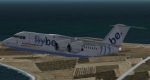
    Flybe BAe 146-200 "G-JEBD"
    for Eurowings Professional
    FS2002
    *************

    Repaint by David Baty

    **INSTALLATION**
    1.
    Extract the archive to a temporary folder and copy the file Texture.be
    to your EW BAe146-200 folder.

    2.
    Add the following lines to the aircraft.cfg
    Replace the X in [flightsim.X] to the next number in series.

    -------Cut Below-------

    [fltsim.X]
    title=Flybe BAe 146-200
    sim=BAE146-200_2k2v2.8
    model=
    panel=ba
    sound=
    texture=be
    kb_checklists=Bae146_check
    kb_reference=Bae146_ref
    atc_airline=
    atc_id=G-JEBD
    atc_flight_number=1134
    atc_id_enable=1
    atc_heavy=0
    ui_manufacturer=British Aerospace
    ui_type=BAe 146-200 (EWPro)
    ui_variation=Fly Be
    description=FS2002 BAe 146-200\nDesign:Marcel Felde 10\/2002\nTextures: Marcel Felde 10\/2002\nRepaint: David Baty 02\/2002\\nFDX: Alexander M. Metzger 2k2V2.8

    -------End cut above-------

    Base paint kit by Aerosoft

    This is my first repaint!
    Enjoy!

    David Baty
    magbaty@hotmail.com
    --------------------
    THIS FILE IS FREEWARE
    • 113 Downloads
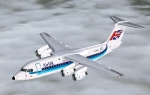
  3. FS2004 BAe 146-200 Air UK G-CHSR,G-CSJH,G-UKLN & G-UKRH

    Four BAe 146 200 textures only for four of the Air UK BAe 146 200 fleet :Requires the Payware "Eurowings professional" BAe 146-200 model by Aerosoft. Repaint Garry Russell
    ----------------------------------------------------------------------------------------------------------------------------------------------------

    Installation

    Place the unzipped texture folder into the BAe 146-200 Europwings Pro folder and paste the above text into the aircraft config renumbering [fltsim.xx] to the next availiable numbers


    ----------------------------------------------------------------------------------------------------------------------------------------------------

    This has been supplied freeware and is therefore to be used without charge.

    It is not to form any part of a package that is not freeware

    These files are to be used on the understanding that they are at the risk of the user and I take no responsibility for any loss of existing files or any other damage that may occur by the use of these files.


    This repaint copyright Garry Russell 2005

    garryrussell8@netscape.net


    This and any of my freeware packages maybe freely distributed provided that it remains freeware and full credit is given to myself for the repaint and full credit is also given for the production and supply of the original model.
    • 180 Downloads
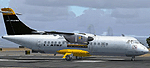
  4. COPY/PASTE into your "aircraft.cfg" of EW ATR 42-300 folder (Eurowings FS 2004 ATR payware package required)
    EW repaint by Marco Spada (m.spada@mclink.it)
    28 November 2003


    [fltsim.6]
    title=Air Industria ATR 42-300
    sim=ATR42-300_2k4v4.4
    model=
    panel=
    sound=
    texture=ai
    kb_checklists=ATR_check
    kb_reference=ATR 42-300_ref
    atc_airline=Lufthansa
    atc_flight_number=1134
    atc_id=I-ATRF
    atc_id_enable=1
    atc_heavy=0
    atc_id_color=000000
    ui_manufacturer=Aerospatiale
    ui_type=ATR 42-300
    ui_variation=Air Industria
    visual_damage=0
    description=FS2004 ATR42-300 Version 3\nDesign: Christoph Klose\nTextures: Stefan Leppek\nFDX: Alexander M. Metzger 2k4v4.4
    • 115 Downloads
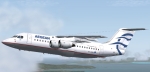
  5. FS2004 BAe 146-200 Aegean Airlines

    BAe 146-200 :Requires the Payware "Eurowings professional" BAe 146-200 model by Aerosoft. Repaint Vasilis Sevastopoulos

    ----------------------------------------------------------------------------------------------------------------------------------------------------

    Installation

    Place the unzipped texture folder into the BAe 146-200 Europwings Pro folder C:\Program Files\Microsoft Games\Flight Simulator 9\Aircraft\BAe 146-200 Eurowings Pro


    ----------------------------------------------------------------------------------------------------------------------------------------------------

    This has been supplied freeware and is therefore to be used without charge.

    It is not to form any part of a package that is not freeware

    These files are to be used on the understanding that they are at the risk of the user and I take no responsibility for any loss of existing files or any other damage that may occur by the use of these files.


    This repaint copyright Vasilis Sevastopoulos 2009


    This and any of my freeware packages maybe freely distributed provided that it remains freeware and full credit is given to myself for the repaint and full credit is also given for the production and supply of the original model.
    • 188 Downloads
    • 1 Comments
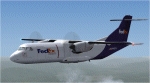
  6. EWPro ATR 42-300 Fedex Feeder Mountain Air Cargo livery


    Copy the (texture.fdx) file in to (c:\Program Files\Microsoft Games\Flight Simulator 9\Aircraft\ATR 42-300 Eurowings Pro) folder
    Open the Aircraft.cfg file and add the rows which can be found below, changing the x with the next number [fltsim.x]

    [fltsim.x]
    title=Fedex ATR 42-300
    sim=ATR42-300_2k4v4.4
    model=
    panel=
    sound=
    texture=fdx
    kb_checklists=ATR_check
    kb_reference=ATR 42-300_ref
    atc_airline=Fedex
    atc_flight_number=909
    atc_id=N909FX
    atc_id_enable=1
    atc_heavy=0
    atc_id_color=000000
    ui_manufacturer=Aerospatiale
    ui_type=ATR 42-300
    ui_variation=Fedex
    visual_damage=0
    description=FS2004 ATR42-300 Version 3\nDesign: Christoph Klose\nMaster Textures: Stefan Leppek\nRepaint:Istvan Biro\nFDX: Alexander M. Metzger 2k4v4.4


    2008
    m814@freemail.hu
    • 243 Downloads
    • 1 Comments

Important Information

We have placed cookies on your device to help make this website better. You can adjust your cookie settings, otherwise we'll assume you're okay to continue. Privacy Policy & Terms of Use

Account

Navigation

Search

Search

Configure browser push notifications

Chrome (Android)
  1. Tap the lock icon next to the address bar.
  2. Tap Permissions → Notifications.
  3. Adjust your preference.
Chrome (Desktop)
  1. Click the padlock icon in the address bar.
  2. Select Site settings.
  3. Find Notifications and adjust your preference.