
About This File
9M-AGZ AirAsia A320 - Aerosoft A320 Professional. Repainted by Erio.
Available for P3D V4 and V5.
Real cabin repainted as AirAsia.
Any chance of update this aircraft, leave a comment with the question below for help.
Enjoy!

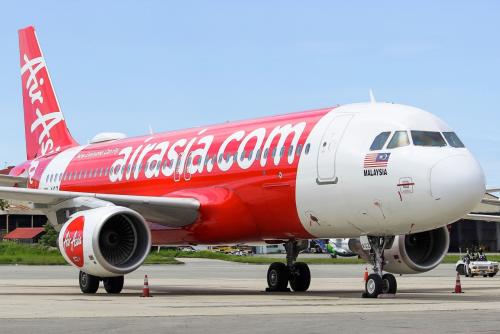
9M-AGZ AirAsia A320 - Aerosoft A320 Professional. Repainted by Erio.
Available for P3D V4 and V5.
Real cabin repainted as AirAsia.
Any chance of update this aircraft, leave a comment with the question below for help.
Enjoy!
Released
UPDATED VERSION 2.2.5
There is a new version of this aircraft textures, cabin and all improvements.
- Enhanced texture adjusted quality
- Realistic AirAsia cabin texture as NEO
- Material texture is disabled due blurring problem as well
README INSTALLATIONS
If you want to put for this aircraft, make sure you have to be the first read.
- Copy this Texture.AirAsia9M-AGM to your C:\P3Dv5 Addons\Aerosoft A320-A321 Pro V5\SimObjects\Airplanes\Aerosoft A320 CFM Professional folder.
- Copy this cabin Tex_FB_CABIN_NEO to your C:\P3Dv5 Addons\Aerosoft A320-A321 Pro V5\SimObjects\Airplanes\Aerosoft A320-A321 Professional Base folder.
- On this site folder of Texture.AirAsia9M-AGZ, open it this "texture.cfg" and copy this write here:
[fltsim]
fallback.1=..\..\Aerosoft A320-A321 Professional Base\Tex_FB_VC
fallback.2=..\..\Aerosoft A320-A321 Professional Base\Tex_FB_A320
fallback.3=..\..\Aerosoft A320-A321 Professional Base\Tex_FB_CABIN_NEO
Good Luck & Have Fun!
We have placed cookies on your device to help make this website better. You can adjust your cookie settings, otherwise we'll assume you're okay to continue. Privacy Policy & Terms of Use
User Feedback
You may only provide a review once you have downloaded the file.