

Jump to content

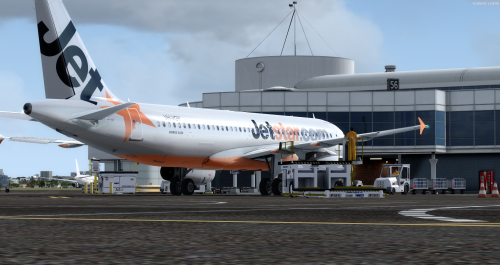
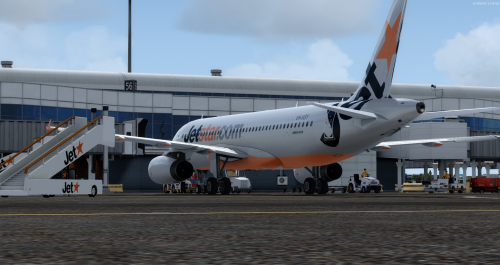
Jetstar A320 VH-VGY Professional 1.2.0

(0 reviews)

9 Screenshots

This is the Jetstar A320 IAE livery that has been updated for P3D v4
I only have made a panel file for the repaint and have also customized the livery to work in P3D v4 and this is a manual install for the aircraft.
If you have any requests for liveries, then please request it to me via discord dm's. You may also join my server where i will be able to check livery requests https://discord.gg/Mdr2eay
If you can't see the download button, then use the scroll bar on the bottom to the right then this will take you to the download button. Also make sure to use Winrar to extract the files.

This aircraft reg is: VH-VGY
The aircraft is an: A320-232

Big thanks for Holgi for letting me use this livery for the exterior model for this repaint, you can check out his livery website at 

http://simtexture.de


What's New in Version 1.2.0

Released

This livery will now be able to be extracted with Winrar
Also the airline has been changed from showing Jetblue to Jetstar in the cfg
You will also be able to see the download button 

User Feedback

Recommended Comments

big_boss_mike

Members

Tried downloading however the file is damaged and or missing files. Can this be repaired please. Thanks.

Bazingabill

Members

On 9/18/2018 at 6:59 PM, big_boss_mike said:

Tried downloading however the file is damaged and or missing files. Can this be repaired please. Thanks.

I will dm you the link to the download where the files should work for you :)


Aaron1

Members

Hi please could you also send me the fixed link? Thanks :) 

Jetstar

Members

On 9/21/2018 at 3:49 PM, Bazingabill said:

I will dm you the link to the download where the files should work for you :)


Me to please mate

ItzKV

Members

ily bill

markerwong

Members

image.thumb.png.0740234a479aa72a8be4ec36b660da94.png


Why my Overhead panel black??
I installed in C:\Users\%My Name%\Documents\Prepar3D v4 Add-ons\AEROSOFT\A320\Aerosoft A320-A321 Professional\SimObjects\Airplanes\Aerosoft A320 IAE Professional

Create an account or sign in to comment

Important Information

We have placed cookies on your device to help make this website better. You can adjust your cookie settings, otherwise we'll assume you're okay to continue. Privacy Policy & Terms of Use

Account

Navigation

Search

Configure browser push notifications

Chrome (Android)
  1. Tap the lock icon next to the address bar.
  2. Tap Permissions → Notifications.
  3. Adjust your preference.
Chrome (Desktop)
  1. Click the padlock icon in the address bar.
  2. Select Site settings.
  3. Find Notifications and adjust your preference.