




About This File
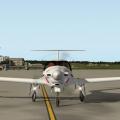
Livery with a german aircraft registration for the Pipistrel Panthera v1.2 (aerobask).
As paintkit i have used the "White" Livery from aerobask.com (http://aerobask.com/panthera/liveries.php)
The livery don't represent a real aircraft. It's a fantasy livery...
The texture is present in a resolution of 2048x2048px.
Installation: Copy the extracted folder "D-EHFB-Panthera" into the folder
<X-Plane main folder>\Aircraft\...\Pipistrel Panthera-1-2\liveries.
Requirements:
X-Plane 10.25+
Installed Pipistrel Panthera v1.2 (aerobask.com)
Have fun with this livery ... Heinz Flichtbeil 06/17/2014
----------------------------------------------------------------------------------------------
German:
Bemalung mit deutscher Kennung für die Pipistrel Panthera v1.2 (aerobask).
Als "Paintkit" habe ich die "White" Livery von aerobask.com verwendet (http://aerobask.com/panthera/liveries.php).
Die Bemalung repräsentiert kein reales Flugzeug. Es ist eine Fantasie Bemalung ...
Die Textur liegt in einer Auflösung von 2048x2048px vor.
Installation: Den Zip Ordner entpacken und den Ordner "D-EHFB-Panthera" in den Ordner
<X-Plane Hauptverzeichnis>\Aircraft\...\Pipistrel Panthera-1-2\liveries kopieren.
Voraussetungen:
X-Plane 10.25+
Installierte Pipistrel Panthera v1.2 (aerobask.com)
Viel Spaß mit dieser Bemalung ... Heinz Flichtbeil, 17.06.2014