Finn
Members
-
Joined
-
Last visited
Everything posted by Finn
-
Seht den titel...
-
Not sure why Your plane crashes when using the Doors. Have You tried to disable the Crash detection settings in MSFS2024's settings ? For me the procedure described is more or less the sama as for every other Aircraft in my Hangar, execpt the Fenix A320, which is alomst fully automatic (a school example on how it should be done".
-
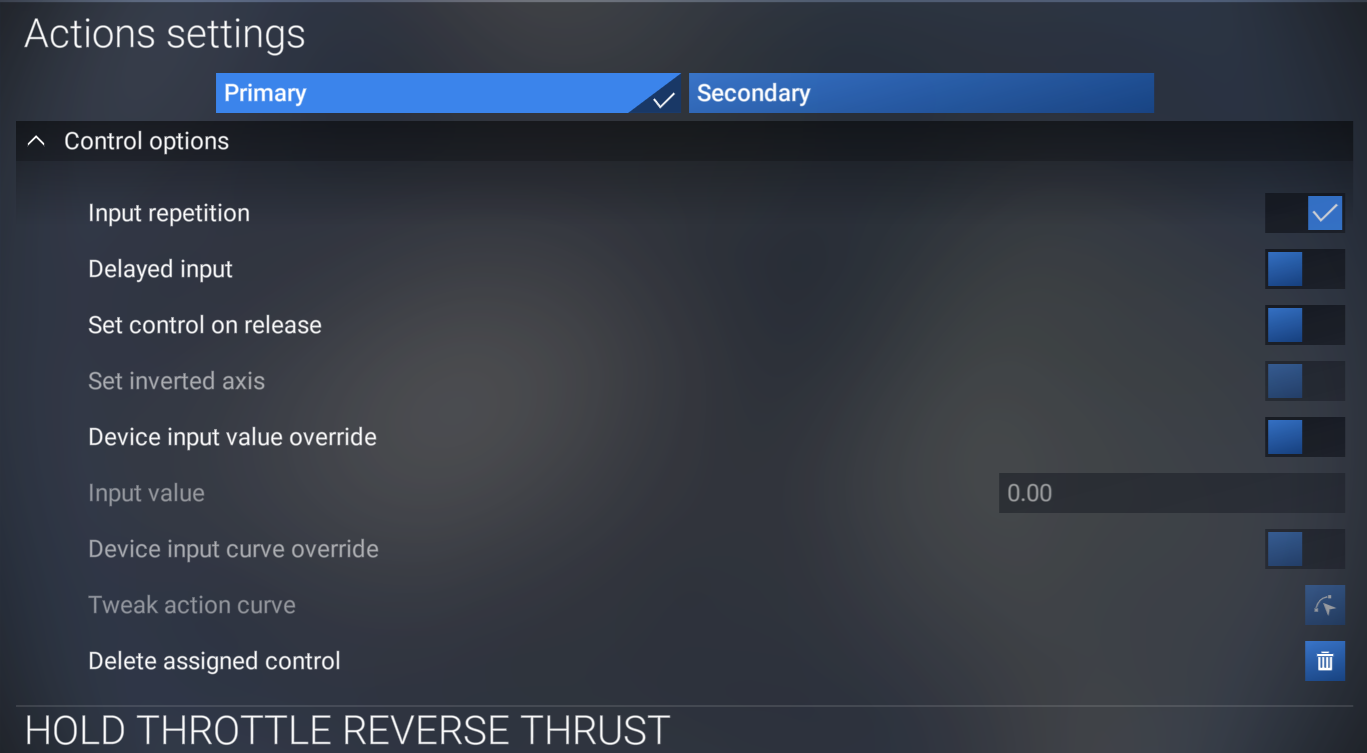
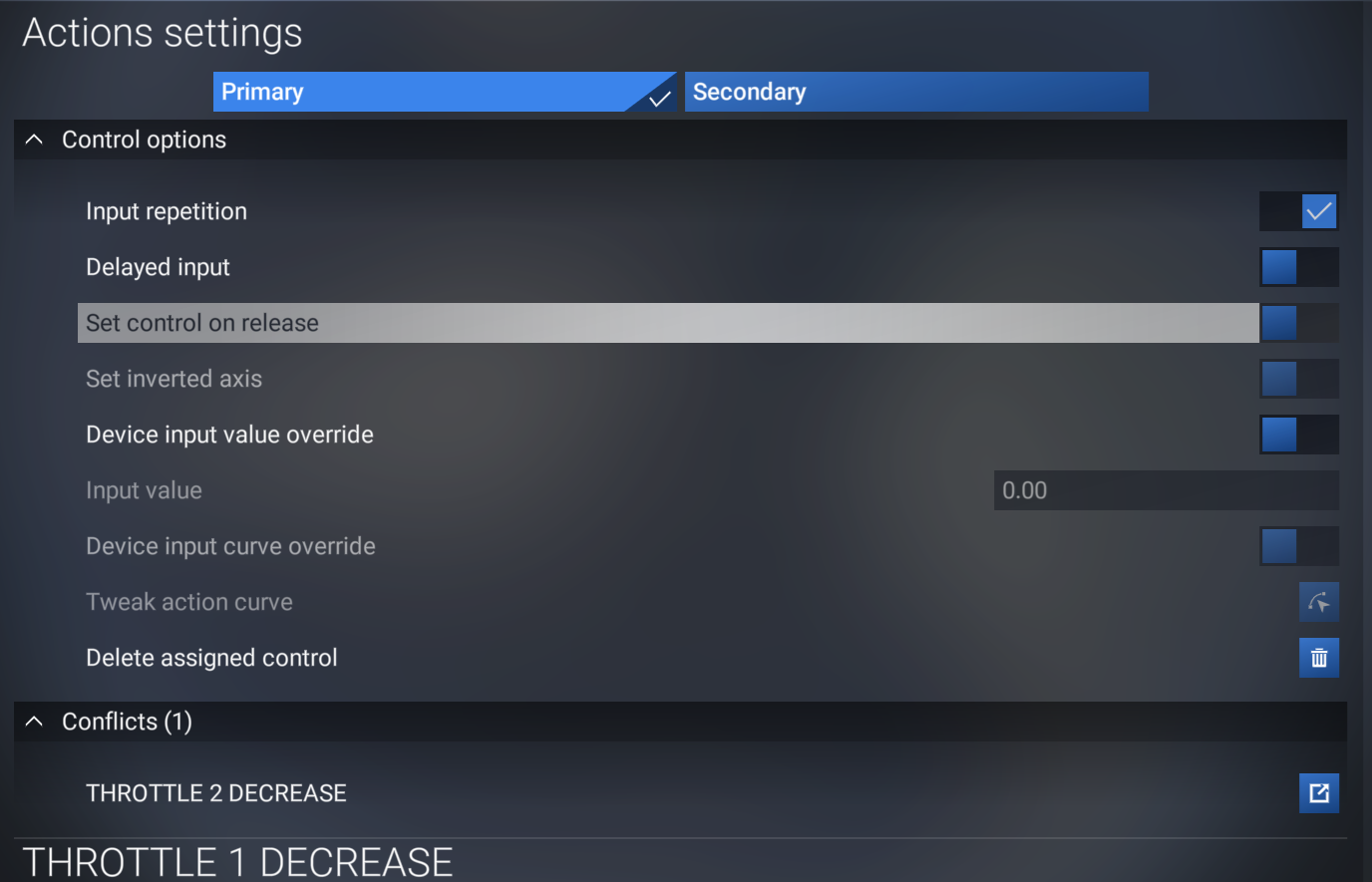
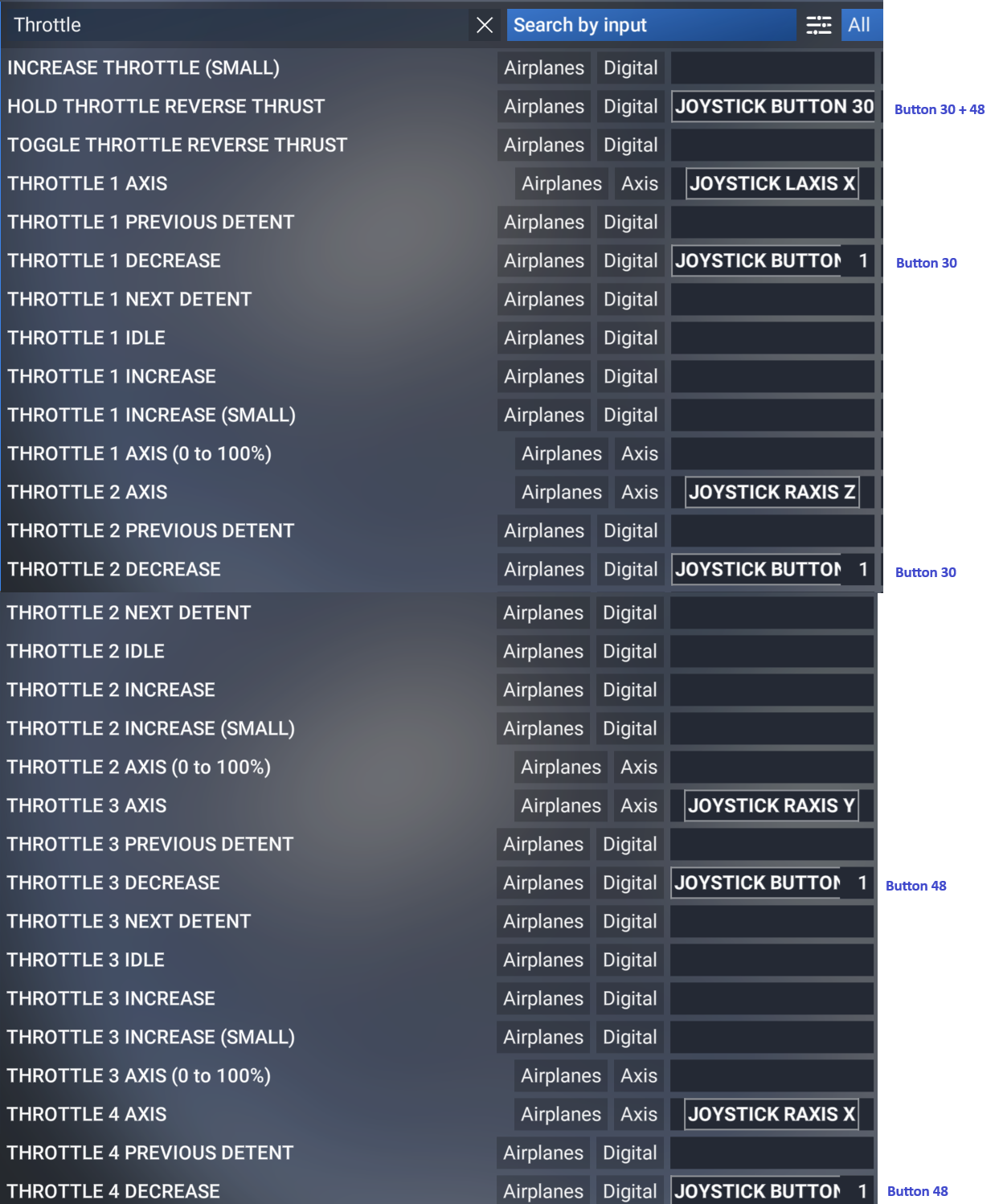
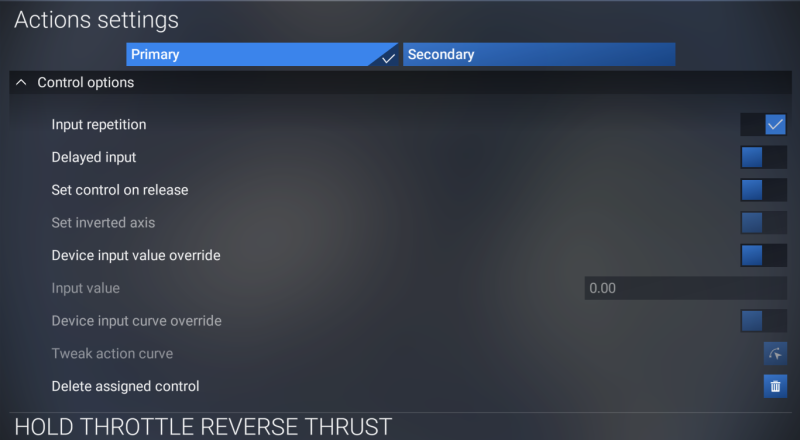
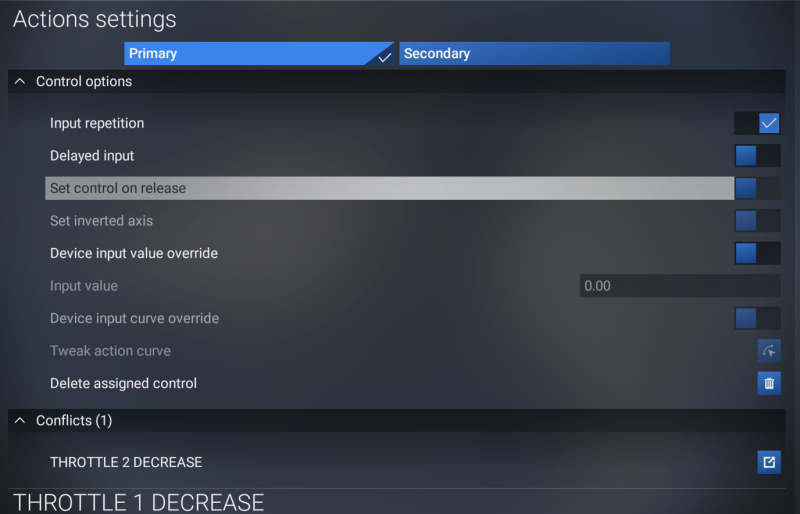
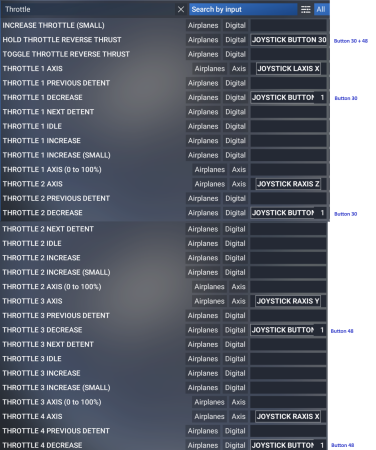
I have made this setup for the Honeycomb Bravo Throttle Quadrant. Throtlle axis 1,2,3 and 4 are set normally and calibrated in the A340-600 EFB. For Reversers I use the Honeycomb Airbus Throttle set, where there only are Reverser levers on Engine 2 and 3. "HOLD THROTTLE REVERSE THRUST" is set to both Reverser lever buttons (Button 30 and 48) Clicking the cock icon I set them as follows: I then set "THROTTLE 1 DECREASE", "THROTTLE 2 DECREASE" to the reverser lever button on Throttle 2 (Button 30) And then set THROTTLE 3 DECREASE" and "THROTTLE 4 DECREASE" to the reverser lever button on Throttle 4 (Button 48) Clicking the cock icon for each "THROTTLE (1-4) DECREASE", I set them as follows: This way all 4 Throttle levers work normally from Idle,CLB, MCT/FLEX and TOGA. Moving the thottles to Idle and then pulling no.2 Reverser lever aft, sets Reverse for Engine 1 and 2 Pulling no.3 Reverser lever aft, sets Reverse for Engine 3 and 4. Pushing the Reverser levers forward and the slightly moving the Throttles slightly forward of idle, stows the Reversers. Here is the main Throttle settings page (Blurry I know):
-
..Or look here, where I have made a GSX profile and a procedure on how to load the Aircraft also with custom re-fueling:
-
+1
-
The Simbrief values for Passengers will be used on the Weight and Balance EFB page, but not Fuel and Cargo. Only after having selected INIT REQUEST on the MCDU the full load will be set. I think the logic is that loading the Simbrief data on the Simbrief OFP tab of the EFB only loads the OFB and sets Passengers, cause it´s not yet active on the Simbrief OFB tab under "Active OFP". This only get's active after requesting "INIT REQUEST" on the MCDU. Doing so will reflect the Simbrief valus 1:1 on mu EFB "Weight & Balance" Tab. Bottom line... Loading Simbrief OFP on the "Simbrief OFP" EFB tab does not realy fully load the Aircratf, onlu INIT REQUEST on the MCDU will.
-
I would really like the direct integration for Sayintentions (and BATC, although I have it, I only uses Sayintetions)
-
Here is a way to make GSX work: Download the GSX files below and copy them into Your %APPDATA%\Virtuali\Airplanes\ folder This is a custom profile pieced together of serveral profiles I found on Flightsim.to, which can be found here: https://flightsim.to/addon/105866/aerosoft-a340-600-pro-gsx-profile-1 https://flightsim.to/addon/105792/aerosoft-a340-600-gsx-profile https://flightsim.to/addon/105790/aerosoft-a340-600-pro-gsx-profile But none of these worked without flaws and also didn´t use the "Custom" refueling. 1. Generate Simbrief Flightplan. 2. Start MSFS2024 and setup the situation. 3. Ensure EFB tab "Simbrief OFB" is set to "Set Payload + Fuel to Simbrief" (Currently only the Payload will be set). 4. Set Fuel in the EFB "Weight & Balance" tab to 15% = 22.000 kg or less (the amount is just a recommendation). 5. Load the Simbrief Flightplan. 6. Ensure all Doors are set to "Close" in the EFB "Ground Services" tab (NOT Auto). 7. Call the Fuel Truck 8. When GSX ask You to enter the Fuel qty, enter the desired Fuel in the "Weight & Balance" tab and select "Quick Fuel". (Fuel will be set instantly in the A340-600, but GSX will refuel progressive"). 9. Call the Catering Trucks. 10. Open Doors 1R & 4R. 11. When Catering is finished - close Doors 1R & 4R. 12. Start Boarding. 13. Once the Jetway or Stairs are attached - Open the relevant left Door(s) and Cargo Doors. 14. Once Boarding complete - Close all relevant left Door(s) and cargo Doors. 15. Commence Push Back. Note: Although I have set Door 2L as the preferred, for me at LEPA, the Jetway uses Door 1L, Maybe because the Jetway can't reach so far back I also found that having the Doors set to "Auto" in the EFB sometimes caused problems, that's why I ensure that all Doors are set to Close before using GSX. airbus-a346-pro.zip
-
You must copy Your Hoppie code from Your Hoppie account, or a text file and paste it in the EFB.
-
Strange... With these settings: Thessaloniki X set to default. Time set to dusk. Weather set via FSGRW. PMDG 737-700 NGX set to High res VC, Model and Displays. Terrain display turned on FTX Global Base pack. My VAS never exeeded 3,2 GB My FSX settings are: Graphics section: 1920x1080x32 FPS Locked at 30 Global texture resolution: Max Preview DirectX 10: Off Lens flare: Off Light Bloom: Off Advanced animations: On Antialiasing and Anisotropic filtering controlled via Nvidia Inspector Aircraft section: Show tooltips: On High resolution VC: On Aircraft casts shadows on the ground: On Aircraft casts shadows on itself: Off Aircraft landing-lights illuminate ground: On Scenery section: Level of detail: Large Mesh complexity: 100 Mesh resolution : 5m Texture resolution: 15cm Water effects: Low 2x Scenery complexity: Extreme dense Autogen complexity: Dense Ground scenery: Off Special effects detail: Medium Weather Section: Cloud draw distance: 60mi Thermal visualization: None Detailed clouds: On Cloud coverage density: High Download winds aloft data with real-world weather: On Disable turbulence and thermal effects on aircraft: Off Rate at which weather changesover time: No change Traffic section (My Traffic 2013 installed): Airline Traffic density: 25 General aviation Traffic density: 15 Airport vehicle density: None Road vehicle density: 16 Ships and ferrys density: 16 Leisure boats density: 10 The only FSX.cfg tweaks I use: [GRAPHICS] HIGHMEMFIX=1 [Display] TEXTURE_BANDWIDTH_MULT=70 WideViewAspect=True [Main] FIBER_FRAME_TIME_FRACTION=0.25 [JOBSCHEDULER] AffinityMask=7 (I know - normally this should be 14, but the Majestic Dash7-Q400 runs smoother with 7) [bUFFERPOOLS] UsePools=1 Poolsize=8388608 RejectThreshold=126976 My system: i7 3770 @3.4 Ghz (No OC) 8 GB RAM Nvidia GTX 560 1GB Win 7 64bit Home edition Finn
-
Nice to hear. Finn
-
As a developer I feel kind of obligated to also participate on giving support for the projects I have been part of. I also feel that I have the right to show up here defend decisions we have made during developement etc. While free speech should be every humans right it still means that You must be responsible for what You say. Happily most posts are positive, informative and serious, but there are also a little group (as in real life) that really can start up and feed useless, unserious discussions and rants. Without the voting system I have very little feedback wether my posts are recieved positivly or not, infact to get the same level of feedback as the rather simple voting system would mean alot of stupid +1 -1 posts that just would flood the forum and other people would simply stop reading cause they don´t want to read through xx pages of nothing. I have a real hard time figuring out whats so wrong with the voting system, its the best ways to tell trolls that their posts are not accepted by the other users and not just by us developers, forum moderators etc. Without a voting system the moderators will be the bad censurating guys, cause it will really mean toughher hands by them if this forum shouldn´t become a state of anarky. Until now the Aerosoft forums has ben the most open and least censurated forum within this hobby. I won´t name them, but I know alot of forums where unwanted (though still legible) posts simply are removed, just because a certain moderating developer or forum moderator doesn´t like to see it posted. I think Aerosoft will do just fine with the good old style of openess while still giving the other users the option to tell whats Ok to post and whats not in what I deem as a real democratic way. Personally I think I will become less present here without a voting system, simply because I won´t seek troubles where I´m defenceless with no option for others to back me up in an easy way. On the otherhand having my own posts downvoted is also a clear way for me to see when I´m on a wrong path. Just my "few" words to this discussion. Best regards Finn Jacobsen (Aerosoft developer)
-
We are extreme sorry if this has caused considable mayhem to general understandment Sorry to say: b jt if this is the main issue of the Bronco, then be it Finn
-
I´m sorry, but most of the reference material, like blueprints etc are given to us with the demand that we don´t share it. Finn
-
Do You mean which forum ? Finn
-
I know that this won´t help You at present, but please read on..... It´s some time since I was participating on this forum. Most posts seems to be focused on problems that Aerosoft now are seriously trying to fix with the Airbus X extended. Airbus X extended will bring You totally re-developed systems like: Autopilot, MCDU, FBW, ND, Aircraft options etc... Also alot of the older code has been re-visited and the ADIR system added. I´m sure most of You will be very happy with the changes - so please head over to the preview forum and follow current progress. http://forum.aerosoft.com/index.php?/topic/49292-airbus-x-extended/page__st__2520 Hint !! Start backwards Finn
-
I don´t know alot about P3D but.... Did You copy the folder found here in to P3D ? /.../Flight Simulator X/Modules/b21_vario/ You might also need to add this to Your DLL.xml for P3D: <Launch.Addon> <Name>b21 vario sound control</Name> <Disabled>False</Disabled> <ManualLoad>False</ManualLoad> <Path>Modules\b21_vario\b21_vario.dll</Path> <DllStartName>module_init</DllStartName> <DllStopName>module_deinit</DllStopName> </Launch.Addon> Finn
-
Please read this: http://forum.aerosoft.com/index.php?/topic/56002-aerosoft-f-16-leading-edge-flaps/#entry391464 Finn
-
According to the info we got during developement (how long was that since.... damned time goes fast )... the behaviouris close to that. Finn
-
Leading edge flaps are not just extended when turning. They are extended as a function of AOA (Angle of attack) - try some slow speed maneuvres and You will see. Finn
-
Sorry for the late reply.... It is true that the aircraft.cfg come pre-configured for the shockwavelights - that was only meant as a service for our customers. But we cannot / will not provide any support for a product that isn't our own - please understand. You can install the shockwave lights and add // before the original lights as well as removing the // for the shockwave lights. If it works then fine, if not - please search the A2A forum for help on those, cause the shockwave lights are their product. On later product we did not add this service for the very same reason. Please also note ! We try our best to provide support right form the "horsesmouth", but most often the inputs from other customers here are as usefull as the ones we can give, but I think I will put a bit more effort in to keep track of the older projects I have been involved in. Finn
-
....Well.. While MS Flight isn´t what we (the FS community) wanted, it could have been the entry door for newbies and a new generation of flightsimmers. So like Eric says - I find no joy in that. Whereas the beancounters won, or MS just had to prove (in a strange way) that there isn´t a profitable market for flightsims, will probably remain unanswered. Regardless why, I´m afraid that a new flight simulator from MS in any lookable future has been closed together with MS Flight. So being cocky helps no one. Finn
-
Das problem die A2A lichter einzubauen ist das der Airbus X mit specielle Landelicht effecte komt, die im aussen und innemodel eingebaut sind. Die kann mann nicht entfernen. Finn
-
Da viele animationen, so wie die spoilers, im Airbus X mit specieller code bewegt werden, kann mann das aussen model nich fuehr sich benutzen. Auch die programmierung des flug models hat viele specielle eintraege die nicht von andere "panels" uebernommen werden kann. Finn
-
Dieses problem kommt wenn das modul GPSmodul.dll, die mit der Airbus X kommt, auhoert zu funktionieren. Das kann vorkommen wenn die C++ libraries korrupt werden. Bitte installiere die microsoft programme C++ 2005+ SP1 und C++ 2008 +SP die hier gefunden werden kann: http://www.microsoft...s.aspx?id=26347 http://www.microsoft...s.aspx?id=26368 Bitte achte das es verschiedene versionen fuehr 32bit und 64bit gibt. Ich bin mir nicht sicher aber es konnte auch sein das "simconnect" fuehr FSX korrupt ist - bitte hier lesen wie man das reparieren kann: http://forum.aerosof...40/#entry170113 Finn