

Skip to content

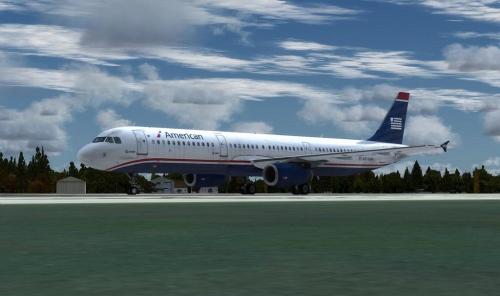
American A321 Legacy US Airways (N578UW) 2.0.0

(0 reviews)

1 Screenshot

Converted American Airlines - US Airways Legacy Repaint. Compatible with Aerosoft A321 Professional.


DISCLAIMER


I TAKE NO CREDIT FOR THIS REPAINT AS I AM NOT THE CREATOR. I SIMPLY CONVERTED IT TO MAKE IT COMPATIBLE WITH THE AEROSOFT AIRBUS PROFESSIONAL SERIES. 

What's New in Version 2.0.0

Released

This is a reupload. I do not own the textures for this aircraft, just simply retrofitted it for the latest version of Prepar3D.

User Feedback

Recommended Comments

Pvazquez

Members

I downloaded it and removed it immediately... The plane is too dirty for my liking. I am flight attendant with AA (previously US) in real life and have flown MANY times on this very aircraft... Don't know why people have to paint them like that. Not realistic at ALL!!... Whoever painted it, get my TWO THUMBS DOWN!!

JerryJet

Members

I needed to add:


model=EXTIAE in the "aircraft.cfg"


to get the plane to display properly

jwcruz825

Members

for me it dont let me install  via the livary maneger 

Debra Ward

Members

Very sloppy, nobody should use this.

jamesbbj

Members

On 9/26/2018 at 12:17 PM, Pvazquez said:

I downloaded it and removed it immediately... The plane is too dirty for my liking. I am flight attendant with AA (previously US) in real life and have flown MANY times on this very aircraft... Don't know why people have to paint them like that. Not realistic at ALL!!... Whoever painted it, get my TWO THUMBS DOWN!!

I'm not sure either, maybe someone could do a repaint of it if we request it.

jamesbbj

Members

On 9/29/2018 at 12:21 PM, JerryJet said:

I needed to add:


model=EXTIAE in the "aircraft.cfg"


to get the plane to display properly

Thanks. I'll update and reload.

jamesbbj

Members

On 11/3/2018 at 9:32 PM, jwcruz825 said:

for me it dont let me install  via the livary maneger 

For manual installation. 

jamesbbj

Members

On 12/8/2018 at 4:46 PM, Debra Ward said:

Very sloppy, nobody should use this.

I'm sorry that you feel this way, again, not my model just did the conversion. I would highly suggest requesting a repaint.

Create an account or sign in to comment

Important Information

We have placed cookies on your device to help make this website better. You can adjust your cookie settings, otherwise we'll assume you're okay to continue. Privacy Policy & Terms of Use

Account

Navigation

Search

Search

Configure browser push notifications

Chrome (Android)
  1. Tap the lock icon next to the address bar.
  2. Tap Permissions → Notifications.
  3. Adjust your preference.
Chrome (Desktop)
  1. Click the padlock icon in the address bar.
  2. Select Site settings.
  3. Find Notifications and adjust your preference.